<?xml version="1.0" encoding="UTF-8"?><feed
	xmlns="http://www.w3.org/2005/Atom"
	xmlns:thr="http://purl.org/syndication/thread/1.0"
	xml:lang="en-GB"
	>
	<title type="text">InFocus</title>
	<subtitle type="text"></subtitle>

	<updated>2026-06-02T08:32:05Z</updated>

	<link rel="alternate" type="text/html" href="https://www.photorestorationretouching.com/" />
	<id>https://www.photorestorationretouching.com/feed/atom/</id>
	<link rel="self" type="application/atom+xml" href="https://www.photorestorationretouching.com/feed/atom/" />

	<generator uri="https://wordpress.org/" version="7.0">WordPress</generator>
	<entry>
		<author>
			<name>Chris Ganser</name>
					</author>

		<title type="html"><![CDATA[No, Your Mobile Phone Is Not as Good as a Professional Camera – Even If You Have the Latest iPhone or Samsung Galaxy]]></title>
		<link rel="alternate" type="text/html" href="https://www.photorestorationretouching.com/no-your-mobile-phone-is-not-as-good-as-a-professional-camera/" />

		<id>https://www.photorestorationretouching.com/?p=3883</id>
		<updated>2026-06-02T08:32:05Z</updated>
		<published>2026-06-02T08:28:00Z</published>
		<category scheme="https://www.photorestorationretouching.com/" term="News and Events" /><category scheme="https://www.photorestorationretouching.com/" term="Photo Retouching Tips" /><category scheme="https://www.photorestorationretouching.com/" term="photography tips" /><category scheme="https://www.photorestorationretouching.com/" term="Wedding" /><category scheme="https://www.photorestorationretouching.com/" term="mobile phone camera quality" /><category scheme="https://www.photorestorationretouching.com/" term="No" /><category scheme="https://www.photorestorationretouching.com/" term="professional camera vs phone camera" /><category scheme="https://www.photorestorationretouching.com/" term="professional photo retoucher" /><category scheme="https://www.photorestorationretouching.com/" term="wedding photo retouching" /><category scheme="https://www.photorestorationretouching.com/" term="why professional cameras are better" /><category scheme="https://www.photorestorationretouching.com/" term="Your Mobile Phone Is Not as Good as a Professional Camera" /><category scheme="https://www.photorestorationretouching.com/" term="Your Mobile Phone Is Not as Good as a Professional Camera – Even If You Have the Latest iPhone or Samsung Galaxy" />
		<summary type="html"><![CDATA[Professional camera vs phone camera Every time a new smartphone launches, we hear the same claims: &#8220;This camera is now as good as a professional DSLR.&#8221; &#8220;You no longer &#8230;]]></summary>

					<content type="html" xml:base="https://www.photorestorationretouching.com/no-your-mobile-phone-is-not-as-good-as-a-professional-camera/"><![CDATA[<h1><img fetchpriority="high" decoding="async" class="alignnone size-full wp-image-3888" src="https://www.photorestorationretouching.com/wp-content/uploads/2026/06/why-professional-cameras-are-better.jpg" alt="No, Your Mobile Phone Is Not as Good as a Professional Camera – Even If You Have the Latest iPhone or Samsung Galaxy" width="800" height="533" srcset="https://www.photorestorationretouching.com/wp-content/uploads/2026/06/why-professional-cameras-are-better.jpg 800w, https://www.photorestorationretouching.com/wp-content/uploads/2026/06/why-professional-cameras-are-better-300x200.jpg 300w, https://www.photorestorationretouching.com/wp-content/uploads/2026/06/why-professional-cameras-are-better-768x512.jpg 768w" sizes="(max-width: 800px) 100vw, 800px" /></h1>
<h2>Professional camera vs phone camera</h2>
<p>Every time a new smartphone launches, we hear the same claims:</p>
<p><em>&#8220;This camera is now as good as a professional DSLR.&#8221;</em></p>
<p><em>&#8220;You no longer need a professional camera.&#8221;</em></p>
<p><em>&#8220;Wedding photographers will soon be replaced by phones.&#8221;</em></p>
<p>As a professional photo retoucher who works on everything from wedding images to damaged family photographs, I can confidently say this:</p>
<p><strong>No, your mobile phone is still not as good as a professional camera—even if you own the latest iPhone or Samsung Galaxy.</strong></p>
<p>That is not to say modern smartphones are bad. In fact, they are incredibly impressive pieces of technology and can produce fantastic images in the right conditions. But when it comes to image quality, flexibility, retouching potential, and professional use, there is still a very large gap between a phone and a dedicated professional camera such as the <strong>Canon EOS R5</strong> or high-end <strong>Sony Alpha series</strong> cameras.</p>
<p>And as a retoucher, I see the difference every single day.</p>
<h2><strong>Why Smartphone Photos Look Good (At First)</strong></h2>
<p>Modern phones rely heavily on something called <strong>computational photography</strong>.</p>
<p>Rather than relying purely on optics and sensor quality, phones use software and artificial intelligence to improve images automatically.</p>
<p>This includes:</p>
<ul>
<li>Artificial sharpening</li>
<li>HDR processing</li>
<li>Noise reduction</li>
<li>AI skin smoothing</li>
<li>Sky enhancements</li>
<li>Simulated background blur (portrait mode)</li>
</ul>
<p>At first glance, photos often look bright, sharp, and highly polished.</p>
<p>But there is a catch.</p>
<p>The moment you zoom in, print large, or attempt professional retouching, the limitations quickly become obvious.</p>
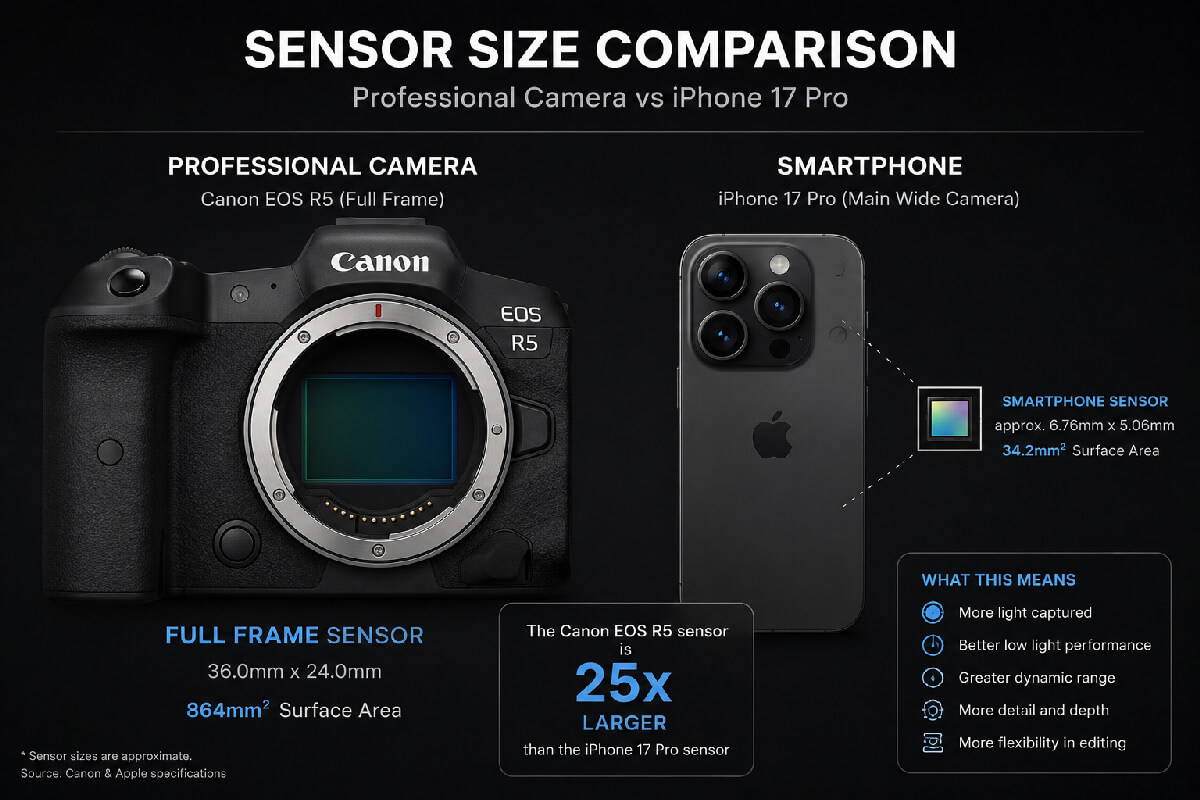
<h2><strong>Sensor Size Matters More Than Marketing</strong></h2>
<p><img decoding="async" class="alignnone size-full wp-image-3887" src="https://www.photorestorationretouching.com/wp-content/uploads/2026/06/professional-camera-vs-phone-camera.jpg" alt="No, Your Mobile Phone Is Not as Good as a Professional Camera – Even If You Have the Latest iPhone or Samsung Galaxy" width="1200" height="800" srcset="https://www.photorestorationretouching.com/wp-content/uploads/2026/06/professional-camera-vs-phone-camera.jpg 1200w, https://www.photorestorationretouching.com/wp-content/uploads/2026/06/professional-camera-vs-phone-camera-300x200.jpg 300w, https://www.photorestorationretouching.com/wp-content/uploads/2026/06/professional-camera-vs-phone-camera-1024x683.jpg 1024w, https://www.photorestorationretouching.com/wp-content/uploads/2026/06/professional-camera-vs-phone-camera-768x512.jpg 768w" sizes="(max-width: 1200px) 100vw, 1200px" /></p>
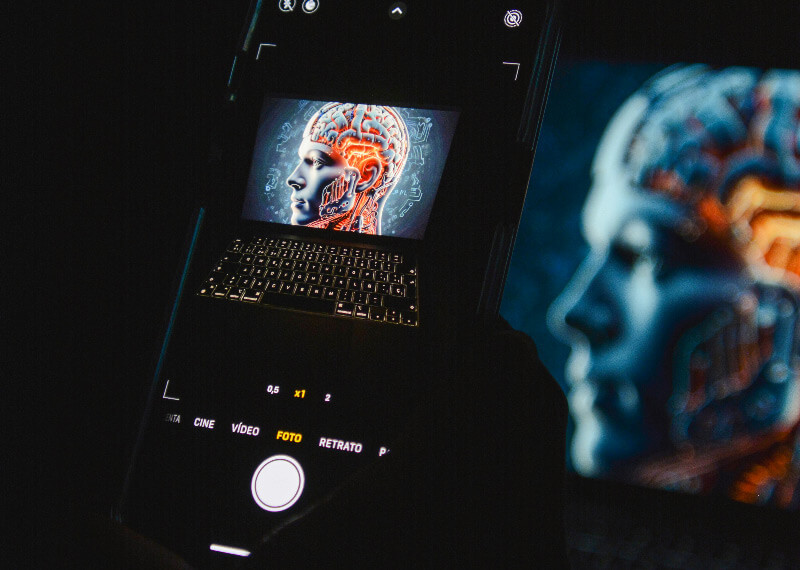
<p>One of the biggest differences between a smartphone and a professional camera is <strong>sensor size</strong>.</p>
<p>A phone sensor is tiny compared to a camera like the <strong>Canon EOS R5</strong> or a professional <strong>Sony mirrorless camera</strong>.</p>
<p>Why does this matter?</p>
<p>Larger sensors capture:</p>
<p>✔ More detail<br />
✔ Better colour depth<br />
✔ Superior dynamic range<br />
✔ Cleaner shadows<br />
✔ Better low-light performance<br />
✔ Less digital noise</p>
<p>When I retouch images, this difference becomes immediately noticeable.</p>
<p>Professional camera files contain significantly more usable information, allowing for:</p>
<ul>
<li>Better skin retouching</li>
<li>Cleaner sharpening</li>
<li>Colour correction without image breakdown</li>
<li>Better recovery of highlights and shadows</li>
</ul>
<p>Phone images often start to fall apart very quickly during editing.</p>
<p>Especially wedding images.</p>
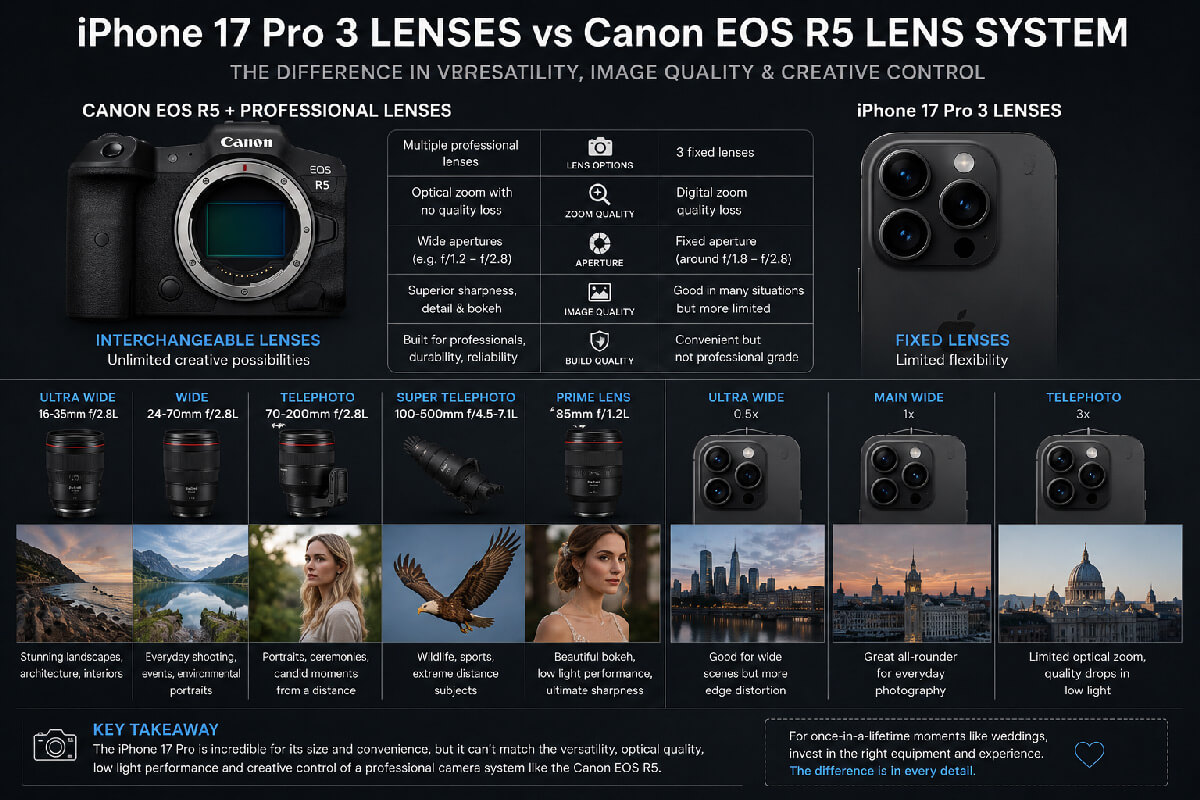
<h2><strong>The Lens Problem: Phones Cannot Replace Professional Glass</strong></h2>
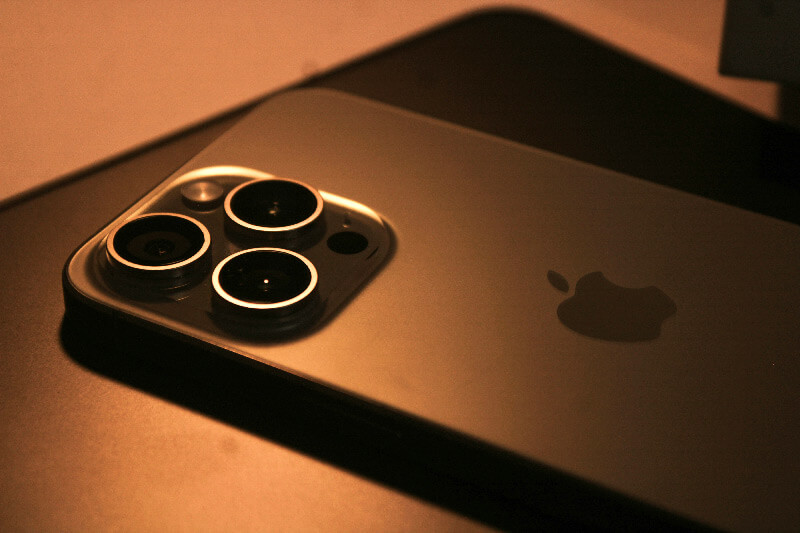
<p><img decoding="async" class="alignnone size-full wp-image-3884" src="https://www.photorestorationretouching.com/wp-content/uploads/2026/06/mobile-phone-camera-quality.jpg" alt="why professional cameras are better" width="1200" height="800" srcset="https://www.photorestorationretouching.com/wp-content/uploads/2026/06/mobile-phone-camera-quality.jpg 1200w, https://www.photorestorationretouching.com/wp-content/uploads/2026/06/mobile-phone-camera-quality-300x200.jpg 300w, https://www.photorestorationretouching.com/wp-content/uploads/2026/06/mobile-phone-camera-quality-1024x683.jpg 1024w, https://www.photorestorationretouching.com/wp-content/uploads/2026/06/mobile-phone-camera-quality-768x512.jpg 768w" sizes="(max-width: 1200px) 100vw, 1200px" /></p>
<p>Another major issue is lenses.</p>
<p>Smartphones may advertise multiple cameras, but they still cannot compete with dedicated professional lenses.</p>
<p>A wedding photographer, for example, may carry:</p>
<ul>
<li>Wide-angle lenses</li>
<li>Fast portrait lenses</li>
<li>Telephoto zooms</li>
<li>Low-light prime lenses</li>
</ul>
<p>These lenses are designed for very specific purposes.</p>
<p>A professional 85mm portrait lens creates beautiful background separation naturally—not artificially.</p>
<p>A fast 24–70mm lens allows flexibility throughout the day.</p>
<p>Meanwhile, phones often rely on digital cropping and software tricks to imitate professional depth of field.</p>
<p>Sometimes it looks convincing on a small screen.</p>
<p>But not always once enlarged or professionally edited.</p>
<h2><strong>RAW Files: The Hidden Difference Most People Never Think About</strong></h2>
<p>One of the biggest misconceptions I hear is:</p>
<p><em>&#8220;But my phone shoots RAW.&#8221;</em></p>
<p>Technically, yes—many premium smartphones now allow RAW capture.</p>
<p>However, smartphone RAW files are still nowhere near the quality of files produced by professional cameras.</p>
<p>A <strong>professional camera RAW file</strong> contains significantly more data.</p>
<p>This means:</p>
<ul>
<li>More editing flexibility</li>
<li>Better recovery of blown highlights</li>
<li>Cleaner shadows</li>
<li>Superior colour grading</li>
<li>More accurate skin tones</li>
</ul>
<p>As a <a href="https://www.photorestorationretouching.com/wedding-photo-retouching/"><strong>professional wedding photo retoucher</strong></a>, I often have to explain to clients why images from phones simply do not retouch as well as files from dedicated cameras.</p>
<p>You can only work with what exists in the image.</p>
<p>If the detail is not there to begin with, no amount of Photoshop can magically recreate it.</p>
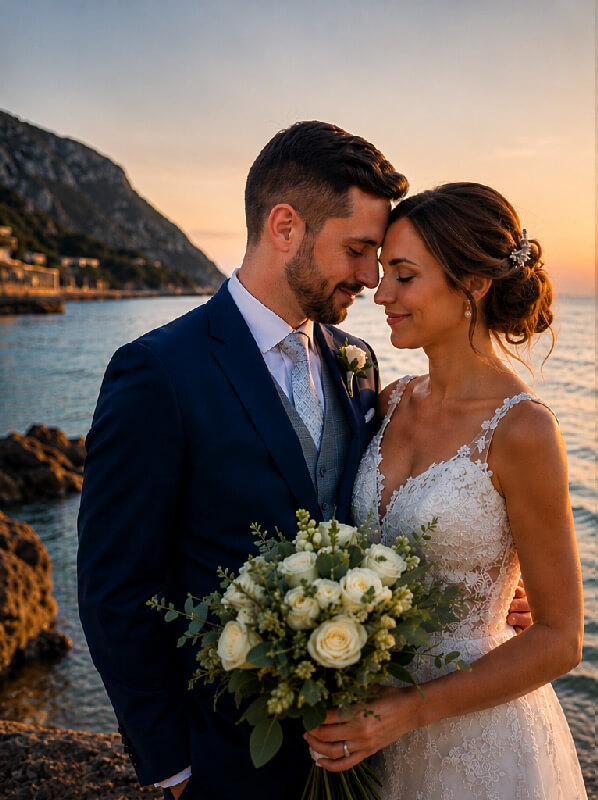
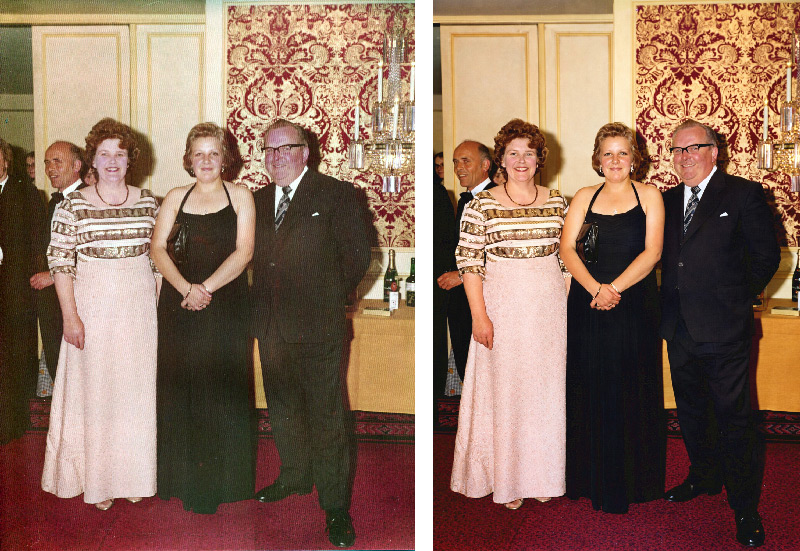
<h2><strong>Wedding Photography: Where the Quality Difference Becomes Huge</strong></h2>
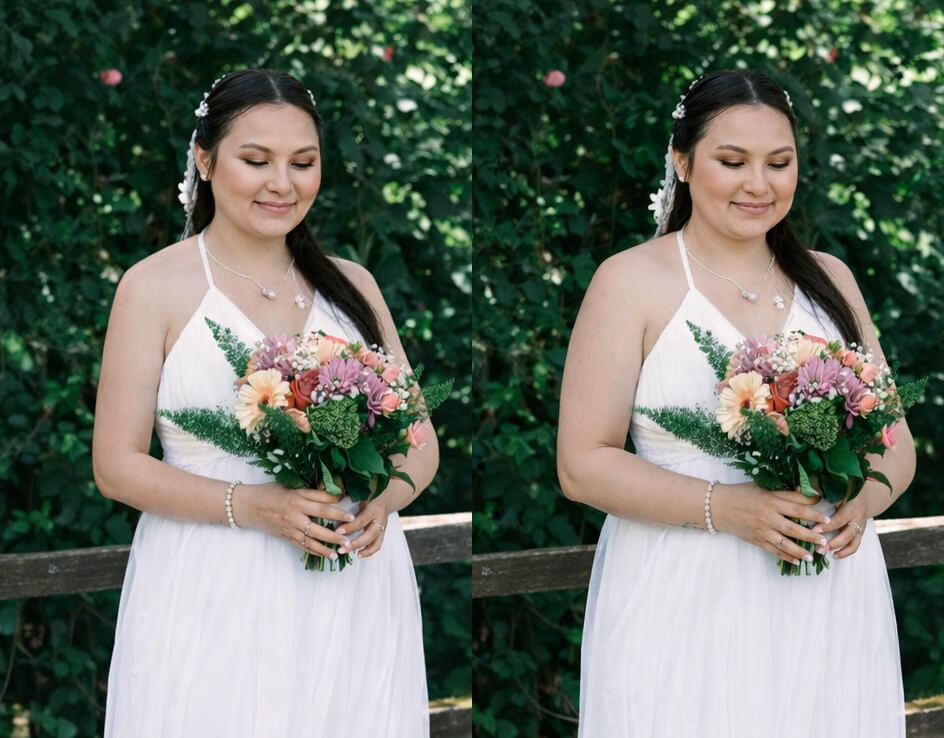
<div class="examples"> <div class="comparison"> <figure> <img decoding="async" src="https://www.photorestorationretouching.com/wp-content/uploads/2026/06/Your-Mobile-Phone-Is-Not-as-Good-as-a-Professional-Camera.jpg" alt=""> <div class="handle"><svg xmlns="http://www.w3.org/2000/svg" width="8.352" height="13.876" viewBox="0 0 8.352 13.876"><path d="M7.645 13.169 1.414 6.938 7.645.707" fill="none" stroke="#191919" stroke-width="2"/></svg> Slide to view <svg xmlns="http://www.w3.org/2000/svg" width="8.352" height="13.876" viewBox="0 0 8.352 13.876"><path d="M7.645 13.169 1.414 6.938 7.645.707" fill="none" stroke="#191919" stroke-width="2"/></svg></div> <div class="divisor" style="background-image: url(https://www.photorestorationretouching.com/wp-content/uploads/2026/06/phone-camera-vs-professional-camera.jpg);"></div> </figure> <input type="range" min="0" max="100" value="50" step="any" class="comparison__slider"><div class="comparison__info"> <p class="comparison__info__title dark"><span>Title: </span>why professional cameras are better</p> <a href="#">Information</a> <div class="comparison__info__content"><p>A side by side comparison of a professional camera vs phone camera</p>
</div> </div></div></div>
<p>This is one of the biggest areas where problems arise.</p>
<p>Many couples understandably want to save money and may hire photographers based on price alone—or assume modern cameras are all the same.</p>
<p>But image quality matters enormously.</p>
<p>Wedding days are often:</p>
<ul>
<li>Fast-moving</li>
<li>Poorly lit</li>
<li>High contrast</li>
<li>Emotionally important</li>
<li>Impossible to recreate</li>
</ul>
<p>Professional cameras perform dramatically better in difficult situations like churches, receptions, candlelight, speeches, and dance floors.</p>
<p>I have had countless occasions where people come to me asking if I can &#8220;fix&#8221; wedding photographs that were taken on poor equipment or heavily compressed.</p>
<p>Unfortunately, there are limits.</p>
<p>Low-quality files often suffer from:</p>
<ul>
<li>Soft focus</li>
<li>Digital noise</li>
<li>Poor dynamic range</li>
<li>Harsh sharpening</li>
<li>Missing detail in faces</li>
<li>Overprocessed skin</li>
</ul>
<p>And once detail is gone, it cannot always be brought back.</p>
<p>This is one reason I always recommend checking what equipment a photographer uses before booking them.</p>
<p>You can <a href="https://websitedesignandmedia.com/finding-the-perfect-wedding-photographer" target="_blank" rel="noopener">read more</a> advice here on choosing the right wedding photographer:</p>
<p>While great photographers can absolutely create amazing work with modest gear, having professional equipment provides consistency, reliability, and better image quality—especially in challenging lighting conditions.</p>
<h2><strong>Low Light: Smartphones Still Struggle</strong></h2>
<p>Phones have improved enormously in low light, but they still rely heavily on software processing.</p>
<p>This often results in:</p>
<ul>
<li>Smudged detail</li>
<li>Artificial sharpening</li>
<li>Watercolour-like textures</li>
<li>Strange skin rendering</li>
</ul>
<p>Meanwhile, cameras such as the <strong>Canon EOS R5</strong> and Sony professional series can maintain detail, colour, and clarity in extremely challenging environments.</p>
<p>As someone who regularly retouches low-light wedding and event photography, the difference remains substantial.</p>
<h2><strong>Are Smartphones Useless? Absolutely Not</strong></h2>
<p>Smartphones are brilliant for:</p>
<p>✔ Holidays<br />
✔ Social media<br />
✔ Quick family moments<br />
✔ Everyday photography<br />
✔ Behind-the-scenes content</p>
<p>They are incredibly convenient and surprisingly capable.</p>
<p>But they are still not replacements for professional cameras when image quality truly matters.</p>
<p>Especially when those images are once-in-a-lifetime memories.</p>
<h2><strong>Final Thoughts: The Right Tool for the Right Job</strong></h2>
<p>The truth is simple:</p>
<p>The latest iPhone or Samsung Galaxy can take fantastic photographs.</p>
<p>But they are still not equal to a professional camera system when it comes to lenses, sensor size, RAW files, low-light performance, and professional retouching potential.</p>
<p>As a retoucher, I see first-hand what happens when image quality drops—and unfortunately, there is only so much editing can do.</p>
<p>So if you are investing in wedding photography, family portraits, branding imagery, or anything truly important, take the time to check your photographer’s experience, portfolio, and yes—the equipment they use.</p>
<p>Because once the moment has passed, there is no second chance to photograph it properly.</p>
]]></content>
		
			</entry>
		<entry>
		<author>
			<name>Chris Ganser</name>
					</author>

		<title type="html"><![CDATA[AI Photo Editing Review: Why AI Still Struggles With Professional Retouching]]></title>
		<link rel="alternate" type="text/html" href="https://www.photorestorationretouching.com/ai-photo-editing-my-latest-real-world-test/" />

		<id>https://www.photorestorationretouching.com/?p=3874</id>
		<updated>2026-05-21T07:11:10Z</updated>
		<published>2026-05-20T15:39:16Z</published>
		<category scheme="https://www.photorestorationretouching.com/" term="Photo Retouching Tips" /><category scheme="https://www.photorestorationretouching.com/" term="Uncategorised" /><category scheme="https://www.photorestorationretouching.com/" term="AI Photo Editing My Latest Real-World Test" /><category scheme="https://www.photorestorationretouching.com/" term="AI Photo Editing Review: Why AI Still Struggles With Professional Retouching" /><category scheme="https://www.photorestorationretouching.com/" term="AI Photo Editing Still Has a Long Way to Go: My Latest Real-World Test" /><category scheme="https://www.photorestorationretouching.com/" term="Why AI Still Struggles With Professional Retouching" />
		<summary type="html"><![CDATA[AI Photo Editing Still Has a Long Way to Go: My Latest Real-World Test Artificial intelligence continues to dominate discussions in the photo editing industry. Every few months, new &#8230;]]></summary>

					<content type="html" xml:base="https://www.photorestorationretouching.com/ai-photo-editing-my-latest-real-world-test/"><![CDATA[<h2 data-section-id="1etpwdn" data-start="0" data-end="72">AI Photo Editing Still Has a Long Way to Go: My Latest Real-World Test</h2>
<p><img loading="lazy" decoding="async" class="alignnone size-full wp-image-3878" src="https://www.photorestorationretouching.com/wp-content/uploads/2026/05/AI-photo-editing-problems.jpg" alt="AI retouching limitations" width="800" height="775" srcset="https://www.photorestorationretouching.com/wp-content/uploads/2026/05/AI-photo-editing-problems.jpg 800w, https://www.photorestorationretouching.com/wp-content/uploads/2026/05/AI-photo-editing-problems-300x291.jpg 300w, https://www.photorestorationretouching.com/wp-content/uploads/2026/05/AI-photo-editing-problems-768x744.jpg 768w" sizes="auto, (max-width: 800px) 100vw, 800px" /></p>
<p data-start="74" data-end="331">Artificial intelligence continues to dominate discussions in the photo editing industry. Every few months, new AI-powered image editing platforms appear, promising faster workflows, automatic retouching, and professional-quality results with minimal effort.</p>
<p data-start="333" data-end="648">As someone who works professionally in <strong data-start="372" data-end="414">photo retouching and photo restoration</strong>, I’ve been following the development of AI photo editing closely for years. I’ve already written several articles on the subject, testing different AI editing tools and comparing them to traditional professional retouching workflows.</p>
<p data-start="650" data-end="918">After my previous experiences testing AI image editing, I decided to continue my research — this time using a platform that specifically marketed itself as an <strong data-start="809" data-end="882">AI photo editing service designed for professional image manipulation</strong> rather than a general AI assistant.</p>
<p data-start="920" data-end="1197">I deliberately chose not to use ChatGPT for this test because, while it is extremely impressive in many areas, it is not a dedicated professional photo editing platform. Instead, I wanted to evaluate AI software built specifically for <strong data-start="1155" data-end="1196">photo editing and retouching services</strong>.</p>
<p data-start="1199" data-end="1301">Unfortunately, the results once again highlighted many of the current limitations of AI image editing.</p>
<h2 data-section-id="wcmw6h" data-start="1308" data-end="1336">The AI Photo Editing Task</h2>
<p><img loading="lazy" decoding="async" class="alignnone size-full wp-image-3876" src="https://www.photorestorationretouching.com/wp-content/uploads/2026/05/AI-photo-editing-test.jpg" alt="AI photo editing" width="800" height="788" srcset="https://www.photorestorationretouching.com/wp-content/uploads/2026/05/AI-photo-editing-test.jpg 800w, https://www.photorestorationretouching.com/wp-content/uploads/2026/05/AI-photo-editing-test-300x296.jpg 300w, https://www.photorestorationretouching.com/wp-content/uploads/2026/05/AI-photo-editing-test-768x756.jpg 768w" sizes="auto, (max-width: 800px) 100vw, 800px" /></p>
<p data-start="1338" data-end="1390">The editing request itself was actually very simple.</p>
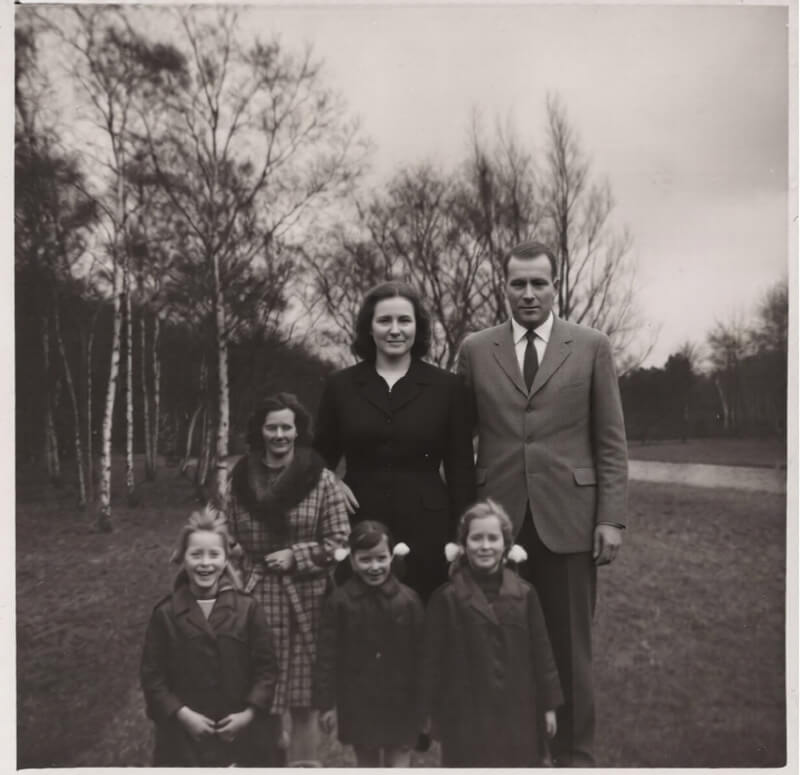
<p data-start="1392" data-end="1398">I had:</p>
<ul data-start="1400" data-end="1496">
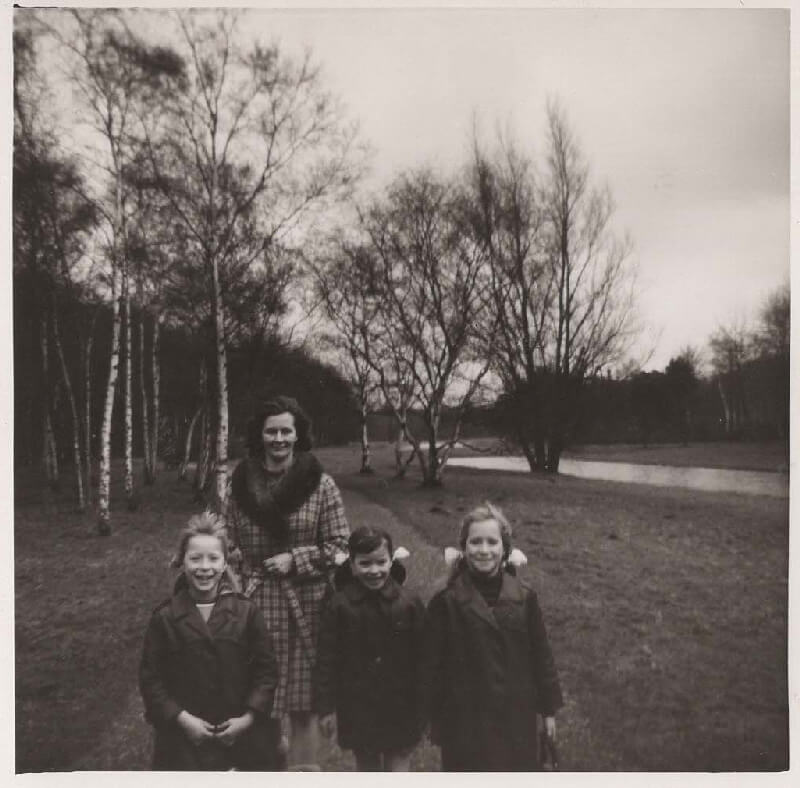
<li data-section-id="18tafie" data-start="1400" data-end="1458">A photograph of a woman standing behind three children</li>
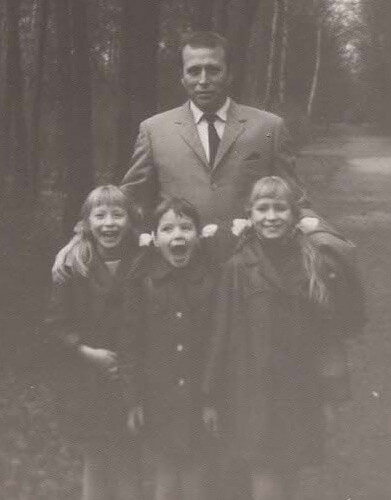
<li data-section-id="1b06at4" data-start="1459" data-end="1496">A separate image containing a man</li>
</ul>
<p data-start="1498" data-end="1637">The goal was straightforward:<br />
Add the man naturally into the main image so that he appeared standing next to the woman behind the children.</p>
<p data-start="1498" data-end="1637"><img loading="lazy" decoding="async" class="alignnone size-full wp-image-3879" src="https://www.photorestorationretouching.com/wp-content/uploads/2026/05/AI-retouching-limitations.jpg" alt="AI editing vs Photoshop" width="391" height="500" srcset="https://www.photorestorationretouching.com/wp-content/uploads/2026/05/AI-retouching-limitations.jpg 391w, https://www.photorestorationretouching.com/wp-content/uploads/2026/05/AI-retouching-limitations-235x300.jpg 235w" sizes="auto, (max-width: 391px) 100vw, 391px" /></p>
<p data-start="1639" data-end="1683">My exact instruction to the AI platform was:</p>
<blockquote data-start="1685" data-end="1837">
<p data-start="1687" data-end="1837">“Please add the man from the smaller image to the image of the lady behind the 3 children. Place the man next to the woman, also behind the children.”</p>
</blockquote>
<p data-start="1839" data-end="1987">This is the type of task that professional photo editors and retouchers perform regularly using tools such as <span class="hover:entity-accent entity-underline inline cursor-pointer align-baseline"><span class="whitespace-normal">Adobe Photoshop</span></span>.</p>
<p data-start="1989" data-end="2055">From a human retouching perspective, the requirements are obvious:</p>
<ul data-start="2057" data-end="2195">
<li data-section-id="1pmzk9d" data-start="2057" data-end="2086">Match the scale correctly</li>
<li data-section-id="8m3cnd" data-start="2087" data-end="2121">Preserve realistic proportions</li>
<li data-section-id="4mx0lo" data-start="2122" data-end="2150">Maintain facial accuracy</li>
<li data-section-id="1f5qhas" data-start="2151" data-end="2195">Blend lighting and perspective naturally</li>
</ul>
<p data-start="2197" data-end="2252">However, the AI-generated result was surprisingly poor.</p>
<h2 data-section-id="116phb2" data-start="2259" data-end="2313">The First AI Editing Failure: Incorrect Proportions</h2>
<p><img loading="lazy" decoding="async" class="alignnone size-full wp-image-3877" src="https://www.photorestorationretouching.com/wp-content/uploads/2026/05/AI-image-editing-review.jpg" alt="why AI photo editing fails" width="800" height="780" srcset="https://www.photorestorationretouching.com/wp-content/uploads/2026/05/AI-image-editing-review.jpg 800w, https://www.photorestorationretouching.com/wp-content/uploads/2026/05/AI-image-editing-review-300x293.jpg 300w, https://www.photorestorationretouching.com/wp-content/uploads/2026/05/AI-image-editing-review-768x749.jpg 768w" sizes="auto, (max-width: 800px) 100vw, 800px" /></p>
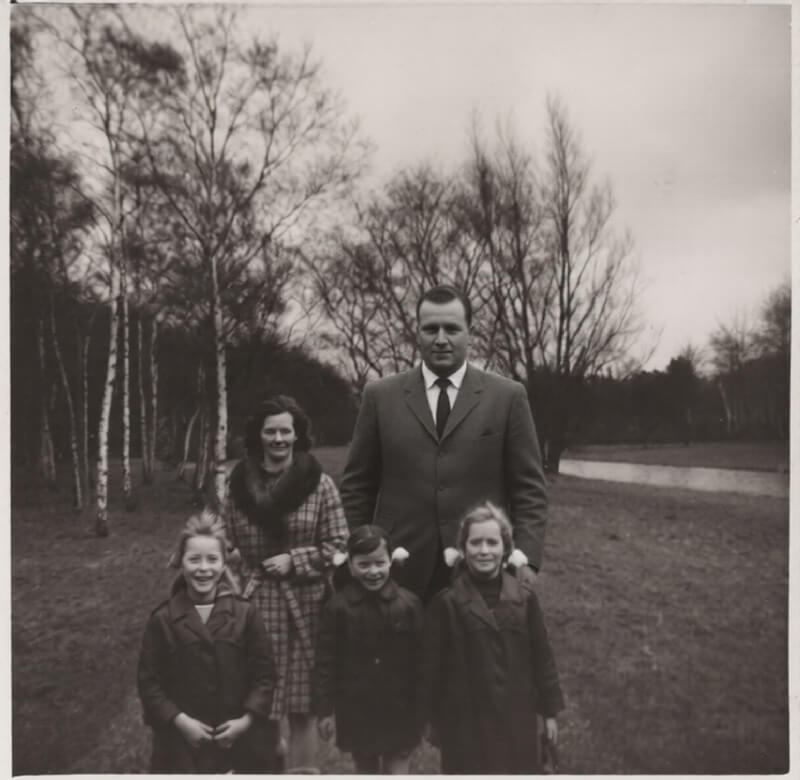
<p data-start="2315" data-end="2412">Although the AI successfully added the man into the image, the proportions were completely wrong.</p>
<p data-start="2414" data-end="2545">The inserted figure was significantly larger than the woman standing beside him, making the composition look unnatural immediately.</p>
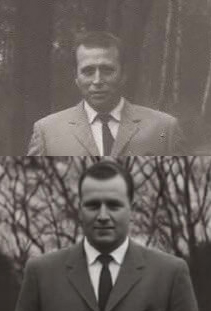
<p data-start="2547" data-end="2778">Even more concerning, I noticed that the AI had subtly altered the man’s face during the editing process. Rather than preserving his original appearance accurately, the system appeared to “reinterpret” parts of his facial features.</p>
<p data-start="2780" data-end="2881">This is one of the recurring problems I continue to encounter when testing AI photo editing software:</p>
<p data-start="2883" data-end="2943">AI often generates approximations rather than precise edits.</p>
<p data-start="2945" data-end="3141">For casual social media use this may not always matter, but for professional work — especially family photographs, wedding photography, or historical restoration — accuracy is extremely important.</p>
<h2 data-section-id="1jo4wzk" data-start="3148" data-end="3184">Attempting to Correct the AI Edit</h2>
<p data-start="3186" data-end="3267">I then uploaded the edited image again and gave a much more specific instruction:</p>
<blockquote data-start="3269" data-end="3340">
<p data-start="3271" data-end="3340">“Please adjust the size of the man to be proportionate to the woman.”</p>
</blockquote>
<p data-start="3342" data-end="3395">This should have been a relatively simple correction.</p>
<p data-start="3397" data-end="3565">However, after processing the image again, there was virtually no visible improvement at all. The proportions still looked incorrect, and the edit remained unrealistic.</p>
<p data-start="3567" data-end="3692">This highlighted another common weakness in current AI photo editing systems:<br />
poor responsiveness to corrective instructions.</p>
<p data-start="3694" data-end="3806">Even when given clear feedback, many AI editing platforms struggle to refine or precisely adjust previous edits.</p>
<h2 data-section-id="1w3i1dq" data-start="3813" data-end="3868">Testing a Second Dedicated AI Photo Editing Platform</h2>
<p><img loading="lazy" decoding="async" class="alignnone size-full wp-image-3878" src="https://www.photorestorationretouching.com/wp-content/uploads/2026/05/AI-photo-editing-problems.jpg" alt="AI retouching limitations" width="800" height="775" srcset="https://www.photorestorationretouching.com/wp-content/uploads/2026/05/AI-photo-editing-problems.jpg 800w, https://www.photorestorationretouching.com/wp-content/uploads/2026/05/AI-photo-editing-problems-300x291.jpg 300w, https://www.photorestorationretouching.com/wp-content/uploads/2026/05/AI-photo-editing-problems-768x744.jpg 768w" sizes="auto, (max-width: 800px) 100vw, 800px" /></p>
<p data-start="3870" data-end="3956">To compare results, I decided to test a completely different AI photo editing service.</p>
<p data-start="3958" data-end="4000">Unfortunately, the outcome was even worse.</p>
<p data-start="4002" data-end="4127">This time, the AI not only added the man incorrectly, but it also duplicated the woman already present in the original image.</p>
<p data-start="4129" data-end="4168">The result looked chaotic and unusable.</p>
<p data-start="4170" data-end="4378">Instead of understanding the structure of the photograph and the relationships between the subjects, the AI appeared to generate entirely new visual elements based on assumptions rather than careful analysis.</p>
<p data-start="4380" data-end="4486">This is a major issue with many current AI editing tools:<br />
they often prioritise generation over precision.</p>
<h2 data-section-id="1g24trh" data-start="4493" data-end="4545">Why AI Still Struggles With Complex Photo Editing</h2>
<p data-start="4547" data-end="4651">Through my ongoing testing of AI image editing tools, several consistent limitations continue to appear.</p>
<h3 data-section-id="1tgwdxe" data-start="4653" data-end="4682">1. Poor Spatial Awareness</h3>
<p data-start="4684" data-end="4717">AI often struggles to understand:</p>
<ul data-start="4719" data-end="4803">
<li data-section-id="fd9g04" data-start="4719" data-end="4734">Perspective</li>
<li data-section-id="1iu7nz8" data-start="4735" data-end="4753">Relative scale</li>
<li data-section-id="5j79ql" data-start="4754" data-end="4777">Subject positioning</li>
<li data-section-id="1ujaant" data-start="4778" data-end="4803">Realistic proportions</li>
</ul>
<p data-start="4805" data-end="4910">This leads to edits where people appear unnaturally large, small, or incorrectly placed within the scene.</p>
<h3 data-section-id="1pty5bl" data-start="4917" data-end="4950">2. Facial Alteration Problems</h3>
<p><img loading="lazy" decoding="async" class="alignnone size-full wp-image-3880" src="https://www.photorestorationretouching.com/wp-content/uploads/2026/05/AI-photo-editing-accuracy-problems.jpg" alt="AI image editing review real world test" width="211" height="311" srcset="https://www.photorestorationretouching.com/wp-content/uploads/2026/05/AI-photo-editing-accuracy-problems.jpg 211w, https://www.photorestorationretouching.com/wp-content/uploads/2026/05/AI-photo-editing-accuracy-problems-204x300.jpg 204w" sizes="auto, (max-width: 211px) 100vw, 211px" /></p>
<p data-start="4952" data-end="5046">One of the most concerning issues is that AI frequently alters facial details unintentionally.</p>
<p data-start="5048" data-end="5162">Rather than preserving the exact likeness of a person, AI systems often “rebuild” faces based on learned patterns.</p>
<p data-start="5164" data-end="5187">This can subtly change:</p>
<ul data-start="5189" data-end="5256">
<li data-section-id="1md5dnt" data-start="5189" data-end="5204">Expressions</li>
<li data-section-id="axjgcd" data-start="5205" data-end="5225">Facial structure</li>
<li data-section-id="17lyqce" data-start="5226" data-end="5239">Eye shape</li>
<li data-section-id="1sxhq94" data-start="5240" data-end="5256">Skin texture</li>
</ul>
<p data-start="5258" data-end="5351">For professional retouching and restoration work, this lack of accuracy is a serious problem.</p>
<h3 data-section-id="1vbd5e2" data-start="5358" data-end="5391">3. Weak Instruction Following</h3>
<p data-start="5393" data-end="5478">Even with very clear prompts, AI platforms often fail to perform precise corrections.</p>
<p data-start="5480" data-end="5508">Simple instructions such as:</p>
<ul data-start="5509" data-end="5576">
<li data-section-id="1llvc2h" data-start="5509" data-end="5524">“Do not crop”</li>
<li data-section-id="vepiv7" data-start="5525" data-end="5555">“Keep proportions realistic”</li>
<li data-section-id="1hhmvs5" data-start="5556" data-end="5576">“Only adjust size”</li>
</ul>
<p data-start="5578" data-end="5627">are frequently ignored or only partially applied.</p>
<h3 data-section-id="1kdj299" data-start="5634" data-end="5681">4. AI Prioritises Generation Over Precision</h3>
<p data-start="5683" data-end="5787">Many AI systems are designed to create visually plausible images rather than technically accurate edits.</p>
<p data-start="5789" data-end="5820">This works reasonably well for:</p>
<ul data-start="5821" data-end="5891">
<li data-section-id="4j2iay" data-start="5821" data-end="5848">artistic image generation</li>
<li data-section-id="f4zuxb" data-start="5849" data-end="5862">concept art</li>
<li data-section-id="vq4ut1" data-start="5863" data-end="5891">quick social media visuals</li>
</ul>
<p data-start="5893" data-end="5933">But professional photo editing requires:</p>
<ul data-start="5934" data-end="5980">
<li data-section-id="1vls27" data-start="5934" data-end="5943">control</li>
<li data-section-id="9kn44m" data-start="5944" data-end="5957">consistency</li>
<li data-section-id="1rriead" data-start="5958" data-end="5968">accuracy</li>
<li data-section-id="njd6xk" data-start="5969" data-end="5980">restraint</li>
</ul>
<p data-start="5982" data-end="6059">These are still areas where experienced human retouchers outperform AI tools.</p>
<h1 data-section-id="nik002" data-start="6066" data-end="6111">AI Photo Editing vs Professional Retouching</h1>
<p data-start="6113" data-end="6223">Artificial intelligence is improving rapidly, and there are areas where AI editing tools are genuinely useful.</p>
<p data-start="6225" data-end="6237">For example:</p>
<ul data-start="6238" data-end="6328">
<li data-section-id="182z9ml" data-start="6238" data-end="6261">simple object removal</li>
<li data-section-id="5djwx2" data-start="6262" data-end="6284">automatic selections</li>
<li data-section-id="rqtlmk" data-start="6285" data-end="6301">quick mock-ups</li>
<li data-section-id="xp3x24" data-start="6302" data-end="6328">basic background cleanup</li>
</ul>
<p data-start="6330" data-end="6378">AI can speed up certain workflows significantly.</p>
<p data-start="6380" data-end="6555">However, in more advanced editing tasks — especially when dealing with people, family photographs, weddings, or sentimental images — human judgment still plays a crucial role.</p>
<p data-start="6557" data-end="6645">Professional retouching is not simply about generating pixels.<br />
It’s about understanding:</p>
<ul data-start="6646" data-end="6713">
<li data-section-id="15mhhv4" data-start="6646" data-end="6659">composition</li>
<li data-section-id="k94x0p" data-start="6660" data-end="6669">anatomy</li>
<li data-section-id="1r6q7km" data-start="6670" data-end="6680">lighting</li>
<li data-section-id="g4uk1x" data-start="6681" data-end="6690">realism</li>
<li data-section-id="znsomi" data-start="6691" data-end="6713">emotional importance</li>
</ul>
<p data-start="6715" data-end="6901">This is why professional <strong data-start="6740" data-end="6769">photo retouching services</strong> still offer a level of precision and reliability that AI currently cannot consistently match.</p>
<h1 data-section-id="33bc4d" data-start="6908" data-end="6944">Final Thoughts on AI Photo Editing</h1>
<p data-start="6946" data-end="7144">My latest AI editing tests once again showed that while AI can sometimes produce impressive results, it still struggles with tasks that require precision, realism, and accurate human representation.</p>
<p data-start="7146" data-end="7160">In both tests:</p>
<ul data-start="7161" data-end="7289">
<li data-section-id="uqcvmj" data-start="7161" data-end="7189">proportions were incorrect</li>
<li data-section-id="1osoacg" data-start="7190" data-end="7219">facial details were altered</li>
<li data-section-id="9tst6p" data-start="7220" data-end="7255">instructions were poorly followed</li>
<li data-section-id="td2y7f" data-start="7256" data-end="7289">compositions became unrealistic</li>
</ul>
<p data-start="7291" data-end="7422">For now, AI photo editing remains best suited as an assistant tool rather than a replacement for professional retouching workflows.</p>
<p data-start="7424" data-end="7545">As AI technology continues to evolve, I’ll continue testing new platforms and sharing real-world results here on my blog.</p>
<p data-start="7547" data-end="7668">If you would like to see examples of professional manual retouching and restoration work, you can visit my homepage here:</p>
<p data-start="7670" data-end="7707"><span class="" data-state="closed"><a class="decorated-link" href="https://www.photorestorationretouching.com/?utm_source=chatgpt.com" target="_blank" rel="noopener">InFocus Photo Retouching</a></span></p>
]]></content>
		
			</entry>
		<entry>
		<author>
			<name>Chris Ganser</name>
					</author>

		<title type="html"><![CDATA[Why Your Photos Look Worse After Sending Them: Understanding DPI, File Size &#038; Hidden Compression]]></title>
		<link rel="alternate" type="text/html" href="https://www.photorestorationretouching.com/why-your-photos-look-worse-after-sending-them/" />

		<id>https://www.photorestorationretouching.com/?p=3862</id>
		<updated>2026-04-27T17:37:00Z</updated>
		<published>2026-04-27T17:29:09Z</published>
		<category scheme="https://www.photorestorationretouching.com/" term="News and Events" /><category scheme="https://www.photorestorationretouching.com/" term="Photo Retouching Tips" /><category scheme="https://www.photorestorationretouching.com/" term="Uncategorised" /><category scheme="https://www.photorestorationretouching.com/" term="email compresses photos quality loss" /><category scheme="https://www.photorestorationretouching.com/" term="how to send high quality photos wetransfer dropbox" /><category scheme="https://www.photorestorationretouching.com/" term="photo file size reduction explained" /><category scheme="https://www.photorestorationretouching.com/" term="photo resolution dpi explained" /><category scheme="https://www.photorestorationretouching.com/" term="send full resolution images" /><category scheme="https://www.photorestorationretouching.com/" term="Why Does My Photo Look Worse Than the Original?" /><category scheme="https://www.photorestorationretouching.com/" term="why images become low resolution" /><category scheme="https://www.photorestorationretouching.com/" term="why photos lose quality on phone" />
		<summary type="html"><![CDATA[Introduction: “Why Does My Photo Look Worse Than the Original?” This is one of the most common (and frustrating) issues I see in photo restoration and retouching. A client &#8230;]]></summary>

					<content type="html" xml:base="https://www.photorestorationretouching.com/why-your-photos-look-worse-after-sending-them/"><![CDATA[<h2>Introduction: “Why Does My Photo Look Worse Than the Original?”</h2>
<p><img loading="lazy" decoding="async" class="alignnone size-full wp-image-3871" src="https://www.photorestorationretouching.com/wp-content/uploads/2026/04/why-images-become-low-resolution.jpg" alt="how to send high quality photos wetransfer dropbox" width="800" height="533" srcset="https://www.photorestorationretouching.com/wp-content/uploads/2026/04/why-images-become-low-resolution.jpg 800w, https://www.photorestorationretouching.com/wp-content/uploads/2026/04/why-images-become-low-resolution-300x200.jpg 300w, https://www.photorestorationretouching.com/wp-content/uploads/2026/04/why-images-become-low-resolution-768x512.jpg 768w" sizes="auto, (max-width: 800px) 100vw, 800px" /></p>
<p class="isSelectedEnd">This is one of the most common (and frustrating) issues I see in photo restoration and retouching.</p>
<p class="isSelectedEnd">A client sends what they believe is a high-quality image…<br />
But when I open it, it’s a <strong>heavily compressed, low-resolution version</strong>—often reduced from several megabytes down to a few hundred kilobytes.</p>
<p class="isSelectedEnd">The result?<br />
Limited detail, reduced quality, and unrealistic expectations about what can be achieved in retouching.</p>
<p class="isSelectedEnd">In this article, I’ll explain:</p>
<ul data-spread="false">
<li>The difference between full-resolution (300 DPI) images and compressed files</li>
<li>How phones and email silently reduce image quality</li>
<li>Why this matters for professional retouching</li>
<li>And how to send your photos properly</li>
</ul>
<h2>What Does 300 DPI Actually Mean?</h2>
<p class="isSelectedEnd">Let’s simplify this.</p>
<p class="isSelectedEnd">A <strong>300 DPI (dots per inch)</strong> image is considered <strong>full resolution for print</strong>. It contains enough pixel data to produce sharp, detailed prints without visible pixelation.</p>
<p class="isSelectedEnd">High-resolution images typically:</p>
<ul data-spread="false">
<li>Have large pixel dimensions (e.g. 4000 × 3000 pixels)</li>
<li>Contain far more detail</li>
<li>Are several megabytes in size</li>
</ul>
<p class="isSelectedEnd">For example:</p>
<ul data-spread="false">
<li>A modern phone photo: <strong>3MB–12MB+</strong> ()</li>
<li>High-resolution camera files: even larger</li>
</ul>
<p class="isSelectedEnd">This detail is what allows:</p>
<ul data-spread="false">
<li>Skin texture to be refined</li>
<li>Scratches to be repaired</li>
<li>Fine retouching work to look natural</li>
</ul>
<h2>Why File Size Matters More Than People Realise</h2>
<p class="isSelectedEnd">File size (KB vs MB) is often the biggest clue to image quality.</p>
<ul data-spread="false">
<li><strong>Megabytes (MB)</strong> = high detail, more data</li>
<li><strong>Kilobytes (KB)</strong> = heavily compressed, reduced detail</li>
</ul>
<p class="isSelectedEnd">Compression works by <strong>removing image data</strong> to make files smaller ()</p>
<p class="isSelectedEnd">That missing data is exactly what retouchers rely on.</p>
<p class="isSelectedEnd">Once it’s gone—it’s gone.</p>
<h2>What Happens When You Upload Photos to Your Phone or Tablet</h2>
<div class="examples"> <div class="comparison"> <figure> <img decoding="async" src="https://www.photorestorationretouching.com/wp-content/uploads/2026/04/why-photos-lose-quality-on-phone.jpg" alt=""> <div class="handle"><svg xmlns="http://www.w3.org/2000/svg" width="8.352" height="13.876" viewBox="0 0 8.352 13.876"><path d="M7.645 13.169 1.414 6.938 7.645.707" fill="none" stroke="#191919" stroke-width="2"/></svg> Slide to view <svg xmlns="http://www.w3.org/2000/svg" width="8.352" height="13.876" viewBox="0 0 8.352 13.876"><path d="M7.645 13.169 1.414 6.938 7.645.707" fill="none" stroke="#191919" stroke-width="2"/></svg></div> <div class="divisor" style="background-image: url(https://www.photorestorationretouching.com/wp-content/uploads/2026/04/email-compresses-photos-quality-loss.jpg);"></div> </figure> <input type="range" min="0" max="100" value="50" step="any" class="comparison__slider"></div></div>
<p class="isSelectedEnd">Many people don’t realise this:</p>
<p class="isSelectedEnd">When images are:</p>
<ul data-spread="false">
<li>Downloaded from messaging apps</li>
<li>Saved from social media</li>
<li>Synced through certain cloud services</li>
</ul>
<p class="isSelectedEnd">They are often <strong>automatically compressed</strong>.</p>
<p class="isSelectedEnd">This can result in:</p>
<ul data-spread="false">
<li>Reduced resolution</li>
<li>Loss of fine detail</li>
<li>Smaller file sizes</li>
</ul>
<p class="isSelectedEnd">A full-resolution image can easily drop from:</p>
<ul data-spread="false">
<li><strong>5MB → 300KB (or less)</strong></li>
</ul>
<p class="isSelectedEnd">Visually, on a phone screen, it may still “look fine”—but zoom in or try to edit it, and the quality loss becomes obvious.</p>
<h2>The Hidden Problem with Email Attachments</h2>
<p class="isSelectedEnd">Email is one of the biggest culprits.</p>
<p class="isSelectedEnd">Most email providers:</p>
<ul data-spread="false">
<li>Limit attachments to <strong>20–25MB total</strong> ()</li>
<li>Automatically compress images</li>
<li>Resize large photos before sending</li>
</ul>
<p class="isSelectedEnd">Typical compression process:</p>
<ul data-spread="false">
<li>Resize from ~4000px → ~1600px</li>
<li>Reduce quality to ~70–80%</li>
<li>Cut file size by <strong>60–75%</strong> ()</li>
</ul>
<p class="isSelectedEnd">This is fine for viewing—but <strong>not for professional editing</strong>.</p>
<h2>A Real-World Problem I See Too Often</h2>
<p class="isSelectedEnd">I’ve had clients unintentionally lose entire wedding albums this way:</p>
<ol start="1" data-spread="false">
<li>Upload full-resolution images to their phone</li>
<li>The phone compresses or downsizes them</li>
<li>Original files are deleted</li>
<li>Only low-quality versions remain</li>
</ol>
<p class="isSelectedEnd">At that point:</p>
<ul data-spread="false">
<li>Print quality is gone</li>
<li>Fine detail is lost</li>
<li>Restoration options become limited</li>
</ul>
<p class="isSelectedEnd">It’s not uncommon—and it’s irreversible.</p>
<h2>Why This Affects Retouching Results</h2>
<p class="isSelectedEnd">When you send a compressed image, you’re effectively giving a retoucher:</p>
<ul data-spread="false">
<li>Less information to work with</li>
<li>Fewer pixels to repair</li>
<li>Reduced tonal range</li>
</ul>
<p class="isSelectedEnd">This means:</p>
<ul data-spread="false">
<li>Skin edits look flatter</li>
<li>Sharpening introduces artefacts</li>
<li>Restorations become approximations rather than true repairs</li>
</ul>
<p class="isSelectedEnd">In short:<br />
<strong>You’re not seeing the full potential of the work—you’re seeing the limits of the file.</strong></p>
<h2>Why Photos Can Look “Fine” on Your Phone</h2>
<p class="isSelectedEnd">This is where confusion happens.</p>
<p class="isSelectedEnd">Compressed images often:</p>
<ul data-spread="false">
<li>Look sharp on small screens</li>
<li>Hide flaws at normal viewing size</li>
</ul>
<p class="isSelectedEnd">But:</p>
<ul data-spread="false">
<li>Zoom in → quality falls apart</li>
<li>Print it → pixelation appears</li>
</ul>
<p class="isSelectedEnd">As one common explanation puts it, resolution determines how much detail an image can actually contain, while compression reduces that data to save space ()</p>
<h2>How to Send Photos Properly (Without Losing Quality)</h2>
<p class="isSelectedEnd">If you want the best possible results, always send <strong>original files</strong>.</p>
<h3>Best Methods:</h3>
<ul data-spread="false">
<li>WeTransfer</li>
<li>Dropbox</li>
<li><a href="https://workspace.google.com/products/drive/" target="_blank" rel="noopener">Google Drive</a></li>
</ul>
<p class="isSelectedEnd">These platforms:</p>
<ul data-spread="false">
<li>Preserve full resolution</li>
<li>Avoid automatic compression</li>
<li>Maintain original file size and quality</li>
</ul>
<h3>Avoid:</h3>
<ul data-spread="false">
<li>Sending via SMS or messaging apps</li>
<li>Emailing large batches of images</li>
<li>Screenshots or re-saved images</li>
</ul>
<h2>Key Takeaway – Always Keep Your Originals</h2>
<p class="isSelectedEnd">The most important rule:</p>
<p class="isSelectedEnd"><strong>Never delete your original high-resolution images.</strong></p>
<p class="isSelectedEnd">Once a photo has been:</p>
<ul data-spread="false">
<li>Compressed</li>
<li>Resized</li>
<li>Re-saved multiple times</li>
</ul>
<p class="isSelectedEnd">…it can never truly be restored to its original quality.</p>
<h2>FAQ: Photo Resolution, File Size &amp; Sending Images</h2>
<h3><strong>What is the difference between DPI and resolution?</strong></h3>
<p class="isSelectedEnd">DPI (dots per inch) relates to print quality, while resolution refers to the number of pixels in an image (e.g. 4000 × 3000). For editing and restoration, <strong>pixel dimensions matter most</strong>, as they determine how much detail is available.</p>
<h3><strong>Why do my photos lose quality when I send them?</strong></h3>
<p class="isSelectedEnd">Most platforms—especially email, messaging apps, and social media—<strong>automatically compress images</strong> to reduce file size. This removes image data, which leads to lower quality.</p>
<h3><strong>Why does my photo look fine on my phone but poor when printed?</strong></h3>
<p class="isSelectedEnd">Phone screens are small and hide imperfections. When you print or zoom in, the <strong>lack of detail in a compressed image becomes visible</strong>, resulting in blur or pixelation.</p>
<h3><strong>Can a low-resolution image be restored to high quality?</strong></h3>
<p class="isSelectedEnd">Not fully. While some improvements can be made, <strong>lost detail cannot be recreated</strong>. High-quality restoration always depends on having the best possible original file.</p>
<h3><strong>What file size should my photos be for professional retouching?</strong></h3>
<p class="isSelectedEnd">Ideally, images should be:</p>
<ul data-spread="false">
<li>Several megabytes in size (MB, not KB)</li>
<li>Original camera or scan files</li>
<li>Full resolution (not downloaded or resized versions)</li>
</ul>
<h3><strong>Does emailing photos reduce their quality?</strong></h3>
<p class="isSelectedEnd">Yes, in many cases. Email providers often:</p>
<ul data-spread="false">
<li>Compress images</li>
<li>Resize large files</li>
<li>Reduce overall quality</li>
</ul>
<p class="isSelectedEnd">This makes them unsuitable for professional editing.</p>
<h3><strong>What is the best way to send photos without losing quality?</strong></h3>
<p class="isSelectedEnd">Use file transfer services such as:</p>
<ul data-spread="false">
<li>WeTransfer</li>
<li>Dropbox</li>
<li>Google Drive</li>
</ul>
<p class="isSelectedEnd">These platforms keep your images at <strong>full resolution with no compression</strong>.</p>
<h3><strong>Can I use photos saved from WhatsApp or social media?</strong></h3>
<p class="isSelectedEnd">These are usually heavily compressed and <strong>not ideal for retouching or printing</strong>. Always try to send the original file instead.</p>
<h3>Should I keep my original photos after sending them?</h3>
<p class="isSelectedEnd">Absolutely. Always keep your original files as a backup. Once a photo is compressed or resized, <strong>the original quality cannot be recovered</strong>.</p>
<h2>Final Thoughts</h2>
<p class="isSelectedEnd">AI tools and modern apps make sharing photos incredibly easy—but often at the cost of quality.</p>
<p class="isSelectedEnd">Understanding the difference between:</p>
<ul data-spread="false">
<li>A <strong>300 DPI, full-resolution image</strong></li>
<li>And a <strong>compressed phone or email version</strong></li>
</ul>
<p class="isSelectedEnd">…is essential if you care about:</p>
<ul data-spread="false">
<li>Print quality</li>
<li>Professional retouching</li>
<li>Long-term preservation</li>
</ul>
<p class="isSelectedEnd">If you’re unsure whether your image is suitable, I’m always happy to take a look and advise before any work begins.</p>
<h2>Further Reading</h2>
<p class="isSelectedEnd">For more on this topic, you can read my earlier article <a href="https://www.photorestorationretouching.com/why-are-cell-phone-photos-so-small/">here</a>:</p>
]]></content>
		
			</entry>
		<entry>
		<author>
			<name>Chris Ganser</name>
					</author>

		<title type="html"><![CDATA[Keep Your retouching Skills Up to Date and Integrate AI Editing Tools]]></title>
		<link rel="alternate" type="text/html" href="https://www.photorestorationretouching.com/keep-your-retouching-skills-up-to-date-and-integrate-ai-editing-tools/" />

		<id>https://www.photorestorationretouching.com/?p=3849</id>
		<updated>2026-04-15T12:20:54Z</updated>
		<published>2026-04-15T11:50:39Z</published>
		<category scheme="https://www.photorestorationretouching.com/" term="News and Events" /><category scheme="https://www.photorestorationretouching.com/" term="Photo Retouching Tips" /><category scheme="https://www.photorestorationretouching.com/" term="Uncategorised" /><category scheme="https://www.photorestorationretouching.com/" term="Affinity Photo editing software" /><category scheme="https://www.photorestorationretouching.com/" term="AI photo retouching workflow" /><category scheme="https://www.photorestorationretouching.com/" term="Keep Your retouching Skills Up to Date and Integrate AI Editing Tools" /><category scheme="https://www.photorestorationretouching.com/" term="modern photo editing software" /><category scheme="https://www.photorestorationretouching.com/" term="Photoshop AI tools" /><category scheme="https://www.photorestorationretouching.com/" term="professional photo retouching techniques" />
		<summary type="html"><![CDATA[The world of photo retouching has changed dramatically over the past few years. What once required hours of manual work can now be achieved in seconds using artificial intelligence. &#8230;]]></summary>

					<content type="html" xml:base="https://www.photorestorationretouching.com/keep-your-retouching-skills-up-to-date-and-integrate-ai-editing-tools/"><![CDATA[<h1 data-section-id="hct15v" data-start="183" data-end="243"><img loading="lazy" decoding="async" class="alignnone size-full wp-image-3856" src="https://www.photorestorationretouching.com/wp-content/uploads/2026/04/Photoshop-AI-tools.png" alt="AI photo retouching workflow" width="1191" height="672" srcset="https://www.photorestorationretouching.com/wp-content/uploads/2026/04/Photoshop-AI-tools.png 1191w, https://www.photorestorationretouching.com/wp-content/uploads/2026/04/Photoshop-AI-tools-300x169.png 300w, https://www.photorestorationretouching.com/wp-content/uploads/2026/04/Photoshop-AI-tools-1024x578.png 1024w, https://www.photorestorationretouching.com/wp-content/uploads/2026/04/Photoshop-AI-tools-768x433.png 768w" sizes="auto, (max-width: 1191px) 100vw, 1191px" /></h1>
<p data-start="245" data-end="324">The world of photo retouching has changed dramatically over the past few years.</p>
<p data-start="326" data-end="519">What once required hours of manual work can now be achieved in seconds using artificial intelligence. Tools have evolved, workflows have accelerated, and expectations from clients have shifted.</p>
<p data-start="521" data-end="552">But one thing remains constant:</p>
<p data-start="554" data-end="635"><strong data-start="554" data-end="635">Professional retouching is still defined by human judgement — not automation.</strong></p>
<p data-start="637" data-end="813">If anything, the rise of AI means it is more important than ever to <strong data-start="705" data-end="779">keep your skills up to date and integrate AI editing tools effectively</strong> rather than rely on them blindly.</p>
<h2 data-section-id="ptdmuj" data-start="820" data-end="862">From 2018 to Now: How Much Has Changed?</h2>
<p data-start="864" data-end="1004">Looking back at my <a href="https://www.photorestorationretouching.com/keep-your-photo-retouching-skills-up-to-date/">original article from 2018</a>:</p>
<p data-start="1006" data-end="1056">It’s clear just how much the industry has evolved.</p>
<p data-start="1058" data-end="1095">Back then, retouching was focused on:</p>
<p data-start="1097" data-end="1198">• manual skin airbrushing<br data-start="1115" data-end="1118" />• cloning and healing<br data-start="1139" data-end="1142" />• layer-based adjustments<br data-start="1167" data-end="1170" />• time-intensive workflows</p>
<p data-start="1200" data-end="1215">Today, we have:</p>
<p data-start="1217" data-end="1341">• AI-powered selection tools<br data-start="1245" data-end="1248" />• automatic object removal<br data-start="1274" data-end="1277" />• neural filters<br data-start="1293" data-end="1296" />• generative fill<br data-start="1313" data-end="1316" />• intelligent upscaling</p>
<p data-start="1343" data-end="1444">The tools have become faster — but the <strong data-start="1382" data-end="1443">responsibility of using them correctly has also increased</strong>.</p>
<p data-start="1343" data-end="1444"><img loading="lazy" decoding="async" class="alignnone size-full wp-image-3859" src="https://www.photorestorationretouching.com/wp-content/uploads/2026/04/keep-your-skills-up-to-date-and-integrate-AI-editing-tools.jpg" alt="professional photo retouching techniques" width="800" height="570" srcset="https://www.photorestorationretouching.com/wp-content/uploads/2026/04/keep-your-skills-up-to-date-and-integrate-AI-editing-tools.jpg 800w, https://www.photorestorationretouching.com/wp-content/uploads/2026/04/keep-your-skills-up-to-date-and-integrate-AI-editing-tools-300x214.jpg 300w, https://www.photorestorationretouching.com/wp-content/uploads/2026/04/keep-your-skills-up-to-date-and-integrate-AI-editing-tools-768x547.jpg 768w" sizes="auto, (max-width: 800px) 100vw, 800px" /></p>
<h2 data-section-id="1ouy0qg" data-start="1451" data-end="1499">Why Keeping Your Retouching Skills Updated Still Matters</h2>
<p data-start="1501" data-end="1587">With AI doing more of the technical work, it’s easy to assume that skill matters less.</p>
<p data-start="1589" data-end="1622">In reality, the opposite is true.</p>
<p data-start="1624" data-end="1651">Modern retouching requires:</p>
<p data-start="1653" data-end="1844">• knowing when to use AI — and when not to<br data-start="1695" data-end="1698" />• maintaining natural results<br data-start="1727" data-end="1730" />• avoiding over-processing<br data-start="1756" data-end="1759" />• understanding light, colour, and texture<br data-start="1801" data-end="1804" />• making subjective creative decisions</p>
<p data-start="1846" data-end="1930">AI can generate an image — but it cannot understand <strong data-start="1898" data-end="1929">intent, context, or emotion</strong>.</p>
<p data-start="1932" data-end="1969">That’s where your expertise comes in.</p>
<h2 data-section-id="x5apph" data-start="1976" data-end="2012">Integrating AI Into Your Photo Retouching Workflow</h2>
<p data-start="2014" data-end="2101">The key to staying relevant is not resisting AI — it’s learning how to use it properly.</p>
<h3 data-section-id="1ps7edg" data-start="2103" data-end="2126">Where AI Helps Most</h3>
<p data-start="2128" data-end="2163">AI photo editing tools are incredibly useful for:</p>
<p data-start="2165" data-end="2296">• removing distractions<br data-start="2188" data-end="2191" />• speeding up selections<br data-start="2215" data-end="2218" />• initial colour balancing<br data-start="2244" data-end="2247" />• batch processing<br data-start="2265" data-end="2268" />• restoring damaged images</p>
<p data-start="2298" data-end="2367">This allows you to focus on the more important aspects of retouching.</p>
<h3 data-section-id="1q3zo7o" data-start="2374" data-end="2407">Where Human Skill Still Leads</h3>
<p data-start="2409" data-end="2452">There are areas where AI still falls short:</p>
<p data-start="2454" data-end="2631">• skin retouching that looks natural<br data-start="2490" data-end="2493" />• subtle tonal adjustments<br data-start="2519" data-end="2522" />• preserving character in portraits<br data-start="2557" data-end="2560" />• ethical editing decisions<br data-start="2587" data-end="2590" />• restoration of historical photographs</p>
<p data-start="2633" data-end="2766">This is especially important in professional services like <a href="https://www.photorestorationretouching.com/real-estate-retouching/">Real estate retouching</a> where accuracy, realism, and consistency matter.</p>
<h2 data-section-id="1217p75" data-start="2823" data-end="2866">Key Photo Editing Software Every Retoucher Should Know</h2>
<p><img loading="lazy" decoding="async" class="alignnone size-full wp-image-3855" src="https://www.photorestorationretouching.com/wp-content/uploads/2026/04/modern-photo-editing-software.jpg" alt="Photoshop AI tools" width="800" height="511" srcset="https://www.photorestorationretouching.com/wp-content/uploads/2026/04/modern-photo-editing-software.jpg 800w, https://www.photorestorationretouching.com/wp-content/uploads/2026/04/modern-photo-editing-software-300x192.jpg 300w, https://www.photorestorationretouching.com/wp-content/uploads/2026/04/modern-photo-editing-software-768x491.jpg 768w" sizes="auto, (max-width: 800px) 100vw, 800px" /></p>
<p>&nbsp;</p>
<h3 data-section-id="r15olf" data-start="2868" data-end="2907">Adobe Photoshop (Industry Standard)</h3>
<p data-start="2909" data-end="3015"><span class="hover:entity-accent entity-underline inline cursor-pointer align-baseline"><span class="whitespace-normal">Adobe Photoshop</span></span> remains the most powerful and widely used digital retouching tool available.</p>
<p data-start="3017" data-end="3051">Recent AI-driven features include:</p>
<p data-start="3053" data-end="3145">• Generative Fill<br data-start="3070" data-end="3073" />• Neural Filters<br data-start="3089" data-end="3092" />• AI object selection<br data-start="3113" data-end="3116" />• automatic sky replacement</p>
<p data-start="3147" data-end="3225">Photoshop is no longer just a manual editing tool — it’s a hybrid AI platform.</p>
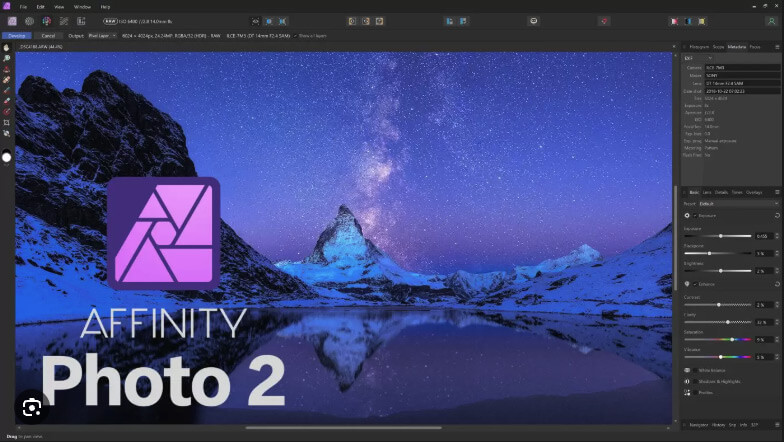
<h3 data-section-id="1wc6hjn" data-start="3232" data-end="3281">Affinity Photo (Now Free and More Accessible)</h3>
<p><img loading="lazy" decoding="async" class="alignnone size-full wp-image-3854" src="https://www.photorestorationretouching.com/wp-content/uploads/2026/04/Keep-Your-retouching-Skills-Up-to-Date-and-Integrate-AI-Editing-Tools.jpg" alt="Affinity Photo editing software" width="784" height="442" srcset="https://www.photorestorationretouching.com/wp-content/uploads/2026/04/Keep-Your-retouching-Skills-Up-to-Date-and-Integrate-AI-Editing-Tools.jpg 784w, https://www.photorestorationretouching.com/wp-content/uploads/2026/04/Keep-Your-retouching-Skills-Up-to-Date-and-Integrate-AI-Editing-Tools-300x169.jpg 300w, https://www.photorestorationretouching.com/wp-content/uploads/2026/04/Keep-Your-retouching-Skills-Up-to-Date-and-Integrate-AI-Editing-Tools-768x433.jpg 768w" sizes="auto, (max-width: 784px) 100vw, 784px" /></p>
<p data-start="3283" data-end="3445"><a href="https://www.affinity.studio/photo-editing-software" target="_blank" rel="noopener"><span class="hover:entity-accent entity-underline inline cursor-pointer align-baseline"><span class="whitespace-normal">Affinity Photo</span></span></a> has become a strong alternative — and its recent move to being free has made professional-level editing far more accessible.</p>
<p data-start="3447" data-end="3457">It offers:</p>
<p data-start="3459" data-end="3599">• advanced layer-based editing<br data-start="3489" data-end="3492" />• powerful retouching tools<br data-start="3519" data-end="3522" />• non-destructive workflows<br data-start="3549" data-end="3552" />• excellent performance without subscriptions</p>
<p data-start="3601" data-end="3660">For many users, it’s now a serious competitor to Photoshop.</p>
<h3 data-section-id="7nghsp" data-start="3667" data-end="3694">Other Emerging AI Tools</h3>
<p data-start="3696" data-end="3758">The editing landscape is expanding rapidly with tools such as:</p>
<p data-start="3760" data-end="3913">• Luminar Neo (AI enhancements)<br data-start="3791" data-end="3794" />• Topaz Photo AI (sharpening and noise reduction)<br data-start="3843" data-end="3846" />• Remove.bg (background removal)<br data-start="3878" data-end="3881" />• Runway ML (AI video editing)</p>
<p data-start="3915" data-end="4035">Each of these tools can enhance productivity — but they still require <strong data-start="3985" data-end="4034">a trained eye to produce professional results</strong>.</p>
<h2 data-section-id="y2nxd3" data-start="4042" data-end="4076">The Risk of Over-Reliance on AI</h2>
<p data-start="4078" data-end="4126">One of the biggest issues today is over-editing.</p>
<p data-start="4128" data-end="4148">AI makes it easy to:</p>
<p data-start="4150" data-end="4254">• oversmooth skin<br data-start="4167" data-end="4170" />• distort proportions<br data-start="4191" data-end="4194" />• create unrealistic lighting<br data-start="4223" data-end="4226" />• remove important details</p>
<p data-start="4256" data-end="4320">This leads to images that look artificial and lack authenticity.</p>
<p data-start="4322" data-end="4385">Professional retouching should enhance — not replace — reality.</p>
<h2 data-section-id="1nhit5g" data-start="4392" data-end="4437">The Future of Photo Retouching: Hybrid Workflows</h2>
<p data-start="4439" data-end="4497">The future isn’t AI vs human — it’s both working together.</p>
<p data-start="4499" data-end="4544">A modern retouching workflow looks like this:</p>
<ol data-start="4546" data-end="4692">
<li data-section-id="ez4uyy" data-start="4546" data-end="4591">AI handles repetitive or technical tasks</li>
<li data-section-id="1wfrecj" data-start="4592" data-end="4631">The retoucher refines and corrects</li>
<li data-section-id="1e18pj9" data-start="4632" data-end="4692">Final decisions are made based on experience and intent</li>
</ol>
<p data-start="4694" data-end="4726">This hybrid approach allows for:</p>
<p data-start="4728" data-end="4804">• faster turnaround times<br data-start="4753" data-end="4756" />• consistent quality<br data-start="4776" data-end="4779" />• more creative control</p>
<h2 data-section-id="o0k8tn" data-start="4811" data-end="4848">Staying Competitive as a Digital Photo Retoucher</h2>
<p data-start="4850" data-end="4887">To stay relevant in today’s industry:</p>
<p data-start="4889" data-end="5051">• continue learning new tools<br data-start="4918" data-end="4921" />• experiment with AI features<br data-start="4950" data-end="4953" />• refine your manual skills<br data-start="4980" data-end="4983" />• understand client expectations<br data-start="5015" data-end="5018" />• develop a clear editing style</p>
<p data-start="5053" data-end="5163">The tools will continue to evolve — but your ability to <strong data-start="5109" data-end="5135">use them intelligently</strong> is what will set you apart.</p>
<h2 data-section-id="114wazr" data-start="5170" data-end="5187">Keep Your retouching Skills Up to Date and Integrate AI Editing Tools &#8211; Final Thoughts</h2>
<p data-start="5189" data-end="5269">The biggest shift in the industry isn’t just technological — it’s philosophical.</p>
<p data-start="5271" data-end="5319">Retouching is no longer about what you <em data-start="5310" data-end="5315">can</em> do.</p>
<p data-start="5321" data-end="5353">It’s about what you <em data-start="5341" data-end="5349">should</em> do.</p>
<p data-start="5355" data-end="5561">By continuing to <strong data-start="5372" data-end="5447">keep your skills up to date and integrate AI editing tools thoughtfully</strong>, you position yourself not just as an editor, but as a professional who understands both technology and artistry.</p>
]]></content>
		
			</entry>
		<entry>
		<author>
			<name>Chris Ganser</name>
					</author>

		<title type="html"><![CDATA[ChatGPT Image Editing Review: Real-World Failures, Limitations &#038; One Surprising Success]]></title>
		<link rel="alternate" type="text/html" href="https://www.photorestorationretouching.com/chatgpt-image-editing-review/" />

		<id>https://www.photorestorationretouching.com/?p=3833</id>
		<updated>2026-04-08T14:43:52Z</updated>
		<published>2026-04-08T11:57:40Z</published>
		<category scheme="https://www.photorestorationretouching.com/" term="Media" /><category scheme="https://www.photorestorationretouching.com/" term="News and Events" /><category scheme="https://www.photorestorationretouching.com/" term="Photo Retouching Tips" /><category scheme="https://www.photorestorationretouching.com/" term="Uncategorised" /><category scheme="https://www.photorestorationretouching.com/" term="AI cropping problems" /><category scheme="https://www.photorestorationretouching.com/" term="AI photo editing limitations" /><category scheme="https://www.photorestorationretouching.com/" term="AI photo restoration tools" /><category scheme="https://www.photorestorationretouching.com/" term="AI retouching problems" /><category scheme="https://www.photorestorationretouching.com/" term="AI vs Photoshop editing" /><category scheme="https://www.photorestorationretouching.com/" term="automated photo editing review" /><category scheme="https://www.photorestorationretouching.com/" term="background removal AI issues" /><category scheme="https://www.photorestorationretouching.com/" term="ChatGPT image editing review" />
		<summary type="html"><![CDATA[Introduction: Can ChatGPT Really Edit Photos Effectively? AI image editing tools are rapidly gaining popularity, promising fast, automated solutions for tasks that traditionally require professional software like Photoshop. But &#8230;]]></summary>

					<content type="html" xml:base="https://www.photorestorationretouching.com/chatgpt-image-editing-review/"><![CDATA[<h1></h1>
<h2>Introduction: Can ChatGPT Really Edit Photos Effectively?</h2>
<p class="isSelectedEnd">AI image editing tools are rapidly gaining popularity, promising fast, automated solutions for tasks that traditionally require professional software like Photoshop. But how well do they actually perform in real-world scenarios?</p>
<p class="isSelectedEnd">Following on from my previous<a href="https://www.photorestorationretouching.com/my-experience-testing-ai-photo-restoration/"> posts on AI image editing</a>, I tested ChatGPT using genuine photo restoration and retouching tasks.</p>
<p class="isSelectedEnd">This article breaks down:</p>
<p>&#8211; 4 real-world AI editing failures</p>
<p>&#8211; 1 unexpected success</p>
<p>-The key limitations of AI photo editing</p>
<p>-When (and when not) to use tools like ChatGPT</p>
<h2>Case Study 1 – AI Colour Correction Failure (Unwanted Cropping Issues)</h2>
<p><img loading="lazy" decoding="async" class="alignnone size-full wp-image-3842" src="https://www.photorestorationretouching.com/wp-content/uploads/2026/04/AI-photo-editing-limitations-1.jpg" alt="AI photo correction review" width="800" height="551" srcset="https://www.photorestorationretouching.com/wp-content/uploads/2026/04/AI-photo-editing-limitations-1.jpg 800w, https://www.photorestorationretouching.com/wp-content/uploads/2026/04/AI-photo-editing-limitations-1-300x207.jpg 300w, https://www.photorestorationretouching.com/wp-content/uploads/2026/04/AI-photo-editing-limitations-1-768x529.jpg 768w" sizes="auto, (max-width: 800px) 100vw, 800px" /></p>
<h3>The Task</h3>
<p class="isSelectedEnd">Apply colour correction to a scanned photograph without altering the composition.</p>
<h3>The Problem</h3>
<p class="isSelectedEnd">Despite clear instructions, ChatGPT repeatedly:</p>
<p class="isSelectedEnd">-Cropped the left and right edges,</p>
<p>-Removed parts of subjects</p>
<p>-Altered the original framing</p>
<p class="isSelectedEnd">-Even after multiple corrections, the issue persisted.</p>
<h3>Why This Matters for Photo Restoration</h3>
<p class="isSelectedEnd">In professional photo restoration:</p>
<p>-Every edge matters</p>
<p>-Cropping can remove irreplaceable details</p>
<p>-Composition must remain intact</p>
<p class="isSelectedEnd"><strong>AI cropping problems</strong> are a major limitation when using automated tools for restoration work.</p>
<h2>Case Study 2 – AI Background Replacement Gone Wrong</h2>
<p><img loading="lazy" decoding="async" class="alignnone size-full wp-image-3841" src="https://www.photorestorationretouching.com/wp-content/uploads/2026/04/AI-background-replacement.jpg" alt="automated image editing," width="1000" height="609" srcset="https://www.photorestorationretouching.com/wp-content/uploads/2026/04/AI-background-replacement.jpg 1000w, https://www.photorestorationretouching.com/wp-content/uploads/2026/04/AI-background-replacement-300x183.jpg 300w, https://www.photorestorationretouching.com/wp-content/uploads/2026/04/AI-background-replacement-768x468.jpg 768w" sizes="auto, (max-width: 1000px) 100vw, 1000px" /></p>
<h3>The Task</h3>
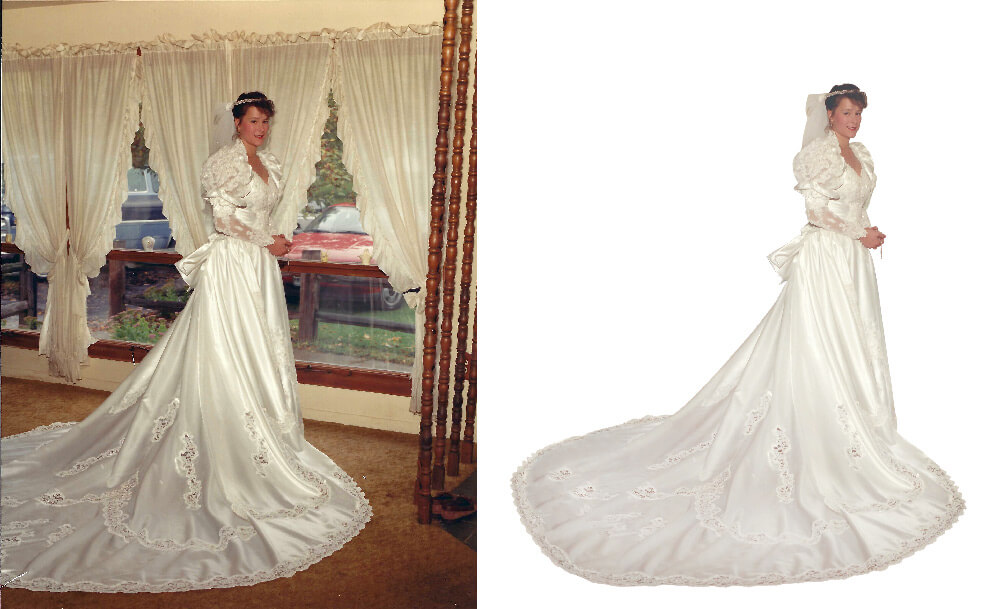
<p class="isSelectedEnd">I added the missing part of the dress to the photo and then cut the bride out for the background. I asked AI to add a realistic light blue background to a bridal portrait while:</p>
<p>-Keeping the full dress visible</p>
<p>-Ensuring the subject looks grounded</p>
<h3>The Problem</h3>
<p><img loading="lazy" decoding="async" class="alignnone size-full wp-image-3843" src="https://www.photorestorationretouching.com/wp-content/uploads/2026/04/AI-photo-editing.jpg" alt="AI photo correction review" width="533" height="800" srcset="https://www.photorestorationretouching.com/wp-content/uploads/2026/04/AI-photo-editing.jpg 533w, https://www.photorestorationretouching.com/wp-content/uploads/2026/04/AI-photo-editing-200x300.jpg 200w" sizes="auto, (max-width: 533px) 100vw, 533px" /></p>
<p class="isSelectedEnd">The AI:</p>
<p>-Cropped the bottom of the dress</p>
<p>-Cut off the train</p>
<p>-Altered the overall composition</p>
<h3>Why AI Struggles Here</h3>
<p class="isSelectedEnd">Background replacement requires:</p>
<p>-Accurate subject masking</p>
<p>-Spatial awareness</p>
<p>-Respect for original framing</p>
<p class="isSelectedEnd">-ChatGPT failed on all three.</p>
<p class="isSelectedEnd"><strong>AI background replacement tools</strong> often struggle with full-frame preservation and subject integrity.</p>
<h2>Case Study 3 – AI Red Eye &amp; Eye Correction Failure</h2>
<p><img loading="lazy" decoding="async" class="alignnone size-full wp-image-3845" src="https://www.photorestorationretouching.com/wp-content/uploads/2026/04/ChatGPT-image-editing-review-1.jpg" alt="AI retouching problems" width="800" height="711" srcset="https://www.photorestorationretouching.com/wp-content/uploads/2026/04/ChatGPT-image-editing-review-1.jpg 800w, https://www.photorestorationretouching.com/wp-content/uploads/2026/04/ChatGPT-image-editing-review-1-300x267.jpg 300w, https://www.photorestorationretouching.com/wp-content/uploads/2026/04/ChatGPT-image-editing-review-1-768x683.jpg 768w" sizes="auto, (max-width: 800px) 100vw, 800px" /></p>
<h3>The Task</h3>
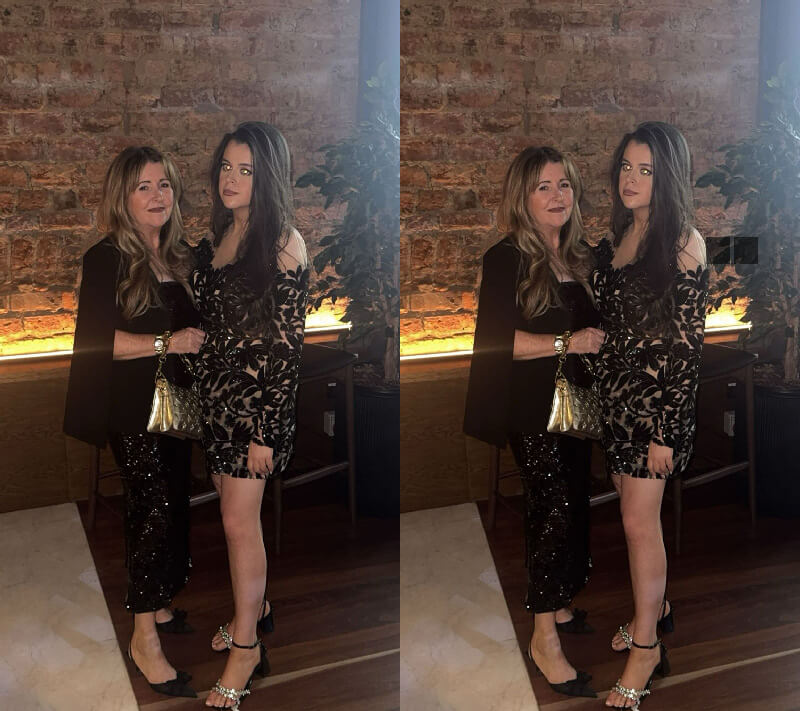
<p class="isSelectedEnd">Fix blown-out eyes caused by flash and match them to a natural reference.</p>
<h3>The Problem</h3>
<p>-Minimal visible improvement &#8211; there is no difference in the before and after photos.</p>
<p>-No realistic iris reconstruction</p>
<p>-Poor colour matching</p>
<h3>Why This Is a Critical Weakness</h3>
<p class="isSelectedEnd">Eye correction requires:</p>
<p>-Fine detail editing</p>
<p>-Anatomical accuracy</p>
<p>-Subtle tonal adjustments</p>
<p class="isSelectedEnd">AI currently lacks precision in all of these areas.</p>
<p class="isSelectedEnd"><strong>AI retouching tools</strong> are not yet reliable for detailed facial corrections.</p>
<h2>Case Study 4 – AI Grass Editing Disaster (Masking Failure)</h2>
<div class="examples"> <div class="comparison"> <figure> <img decoding="async" src="https://www.photorestorationretouching.com/wp-content/uploads/2026/04/AI-photo-editing-limitations.jpg" alt=""> <div class="handle"><svg xmlns="http://www.w3.org/2000/svg" width="8.352" height="13.876" viewBox="0 0 8.352 13.876"><path d="M7.645 13.169 1.414 6.938 7.645.707" fill="none" stroke="#191919" stroke-width="2"/></svg> Slide to view <svg xmlns="http://www.w3.org/2000/svg" width="8.352" height="13.876" viewBox="0 0 8.352 13.876"><path d="M7.645 13.169 1.414 6.938 7.645.707" fill="none" stroke="#191919" stroke-width="2"/></svg></div> <div class="divisor" style="background-image: url(https://www.photorestorationretouching.com/wp-content/uploads/2026/04/ChatGPT-image-editing-review.jpg);"></div> </figure> <input type="range" min="0" max="100" value="50" step="any" class="comparison__slider"></div></div>
<h3>The Task</h3>
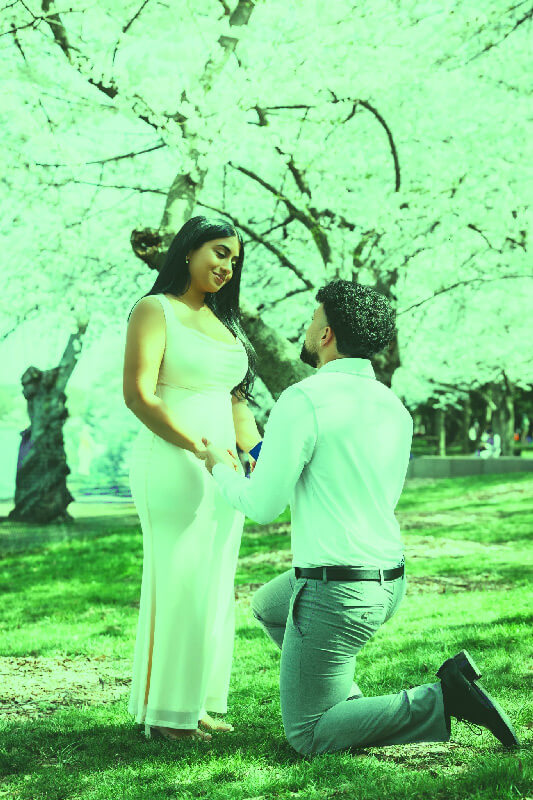
<p class="isSelectedEnd">Fix patchy grass by:</p>
<p>-Filling only brown areas</p>
<p>-Leaving people untouched</p>
<h3> The Problem</h3>
<p>-Entire image tinted green</p>
<p>-Skin tones affected</p>
<p>-No proper subject isolation</p>
<h3>-Root Cause</h3>
<p class="isSelectedEnd">This highlights a major limitation:</p>
<p>-Poor masking and selection</p>
<p>-Inability to distinguish foreground vs background</p>
<p class="isSelectedEnd"><strong>AI masking failures</strong> are one of the biggest barriers to professional-level editing.</p>
<h2>The One Success – AI Object Removal (Wine Glasses)</h2>
<p><img loading="lazy" decoding="async" class="alignnone size-full wp-image-3846" src="https://www.photorestorationretouching.com/wp-content/uploads/2026/04/Mahan_2025SummerParty__28.jpg" alt="AI photo editing" width="800" height="267" srcset="https://www.photorestorationretouching.com/wp-content/uploads/2026/04/Mahan_2025SummerParty__28.jpg 800w, https://www.photorestorationretouching.com/wp-content/uploads/2026/04/Mahan_2025SummerParty__28-300x100.jpg 300w, https://www.photorestorationretouching.com/wp-content/uploads/2026/04/Mahan_2025SummerParty__28-768x256.jpg 768w" sizes="auto, (max-width: 800px) 100vw, 800px" /></p>
<h3>The Task</h3>
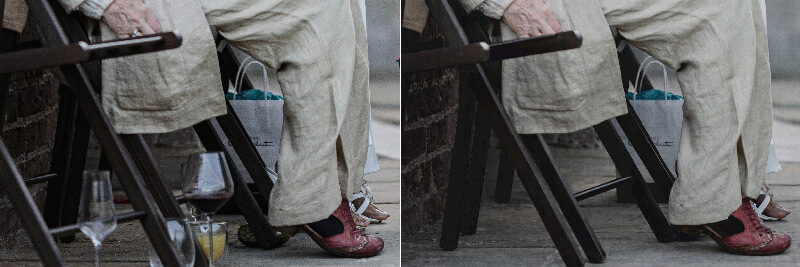
<p class="isSelectedEnd">Remove multiple wine glasses from a scene.</p>
<h3> The Result</h3>
<p>-Clean removal</p>
<p>-Natural background reconstruction</p>
<p>-No visible artefacts</p>
<h3>Why This Worked</h3>
<p class="isSelectedEnd">AI performs well when:</p>
<p>-Removing objects (not reconstructing detail)</p>
<p>-Filling predictable backgrounds</p>
<p>-Working with simple patterns</p>
<p class="isSelectedEnd"><strong>AI object removal tools</strong> are currently one of the strongest use cases for AI editing.</p>
<h2>Key Limitations of ChatGPT for Image Editing</h2>
<h3>1. Poor Instruction Following</h3>
<p class="isSelectedEnd">Even explicit instructions like “do not crop” were ignored.</p>
<h3> 2. Weak Composition Awareness</h3>
<p class="isSelectedEnd">AI struggles to preserve:</p>
<p>-Edges</p>
<p>-Framing</p>
<p>I-mportant visual elements</p>
<h3> 3. Inconsistent Masking</h3>
<p class="isSelectedEnd">Selective edits often affect unintended areas.</p>
<h3>4. Lack of Precision</h3>
<p class="isSelectedEnd">Fine-detail work (eyes, textures, skin) is unreliable.</p>
<h3> 5. Over-Aggressive Edits</h3>
<p class="isSelectedEnd">Changes are often applied globally rather than selectively.</p>
<h2>When AI Photo Editing Works (And When It Doesn’t)</h2>
<h3>Best Use Cases for AI</h3>
<p>-Object removal</p>
<p>-Quick mock-ups</p>
<p>-Basic enhancements</p>
<h3>Where AI Falls Short</h3>
<p>-Professional retouching</p>
<p>-Photo restoration</p>
<p>-Precision edits</p>
<p>-Complex masking tasks</p>
<h2>ChatGPT vs Traditional Photo Editing Tools</h2>
<p class="isSelectedEnd">While AI tools offer speed and convenience, they currently lack:</p>
<p>-Control</p>
<p>-Precision</p>
<p>-Reliability</p>
<p class="isSelectedEnd">Professional tools still outperform AI in:</p>
<p>-Detailed retouching</p>
<p>-Layer-based editing</p>
<p>-Selective adjustments</p>
<h2>Final Verdict – Is ChatGPT Good for Image Editing?</h2>
<p class="isSelectedEnd">ChatGPT shows promise, but based on these tests:</p>
<p class="isSelectedEnd"><strong>Pros:</strong></p>
<p>-Fast</p>
<p>-Easy to use</p>
<p>-Strong object removal</p>
<p class="isSelectedEnd"><strong>Cons:</strong></p>
<p>-Cropping issues</p>
<p>-Poor masking</p>
<p>-Weak detail editing</p>
<p>I-nconsistent results</p>
<h3> -Bottom Line</h3>
<p class="isSelectedEnd">AI image editing is a useful assistant—but not a replacement for professional workflows.</p>
<h2>Further Reading on AI Photo Editing</h2>
<p class="isSelectedEnd">For more insights and real-world tests, <a href="https://www.photorestorationretouching.com/news/">visit my blog</a>.</p>
<h2>Share Your Experience</h2>
<p class="isSelectedEnd">Have you tried AI for photo editing?<br />
What worked—and what failed?</p>
<p>Sharing real-world results helps cut through the hype and gives a clearer picture of where AI truly stands today.</p>
]]></content>
		
			</entry>
		<entry>
		<author>
			<name>Chris Ganser</name>
					</author>

		<title type="html"><![CDATA[My Experience Testing AI Photo Restoration: Where It Falls Short]]></title>
		<link rel="alternate" type="text/html" href="https://www.photorestorationretouching.com/my-experience-testing-ai-photo-restoration/" />

		<id>https://www.photorestorationretouching.com/?p=3821</id>
		<updated>2026-03-17T16:27:40Z</updated>
		<published>2026-03-17T16:26:24Z</published>
		<category scheme="https://www.photorestorationretouching.com/" term="Media" /><category scheme="https://www.photorestorationretouching.com/" term="News and Events" /><category scheme="https://www.photorestorationretouching.com/" term="Photo Retouching Tips" /><category scheme="https://www.photorestorationretouching.com/" term="Uncategorised" /><category scheme="https://www.photorestorationretouching.com/" term="AI photo editing limitations" /><category scheme="https://www.photorestorationretouching.com/" term="AI photo restoration" /><category scheme="https://www.photorestorationretouching.com/" term="manual photo restoration vs AI" /><category scheme="https://www.photorestorationretouching.com/" term="photo restoration workflow" />
		<summary type="html"><![CDATA[AI Photo Restoration vs Professional Workflow: A Real-World Test AI photo restoration is becoming increasingly popular, promising fast results with minimal effort. But how does it really compare to &#8230;]]></summary>

					<content type="html" xml:base="https://www.photorestorationretouching.com/my-experience-testing-ai-photo-restoration/"><![CDATA[<div class="examples"> <div class="comparison"> <figure> <img decoding="async" src="https://www.photorestorationretouching.com/wp-content/uploads/2026/03/manual-photo-restoration-vs-AI.jpg" alt=""> <div class="handle"><svg xmlns="http://www.w3.org/2000/svg" width="8.352" height="13.876" viewBox="0 0 8.352 13.876"><path d="M7.645 13.169 1.414 6.938 7.645.707" fill="none" stroke="#191919" stroke-width="2"/></svg> Slide to view <svg xmlns="http://www.w3.org/2000/svg" width="8.352" height="13.876" viewBox="0 0 8.352 13.876"><path d="M7.645 13.169 1.414 6.938 7.645.707" fill="none" stroke="#191919" stroke-width="2"/></svg></div> <div class="divisor" style="background-image: url(https://www.photorestorationretouching.com/wp-content/uploads/2026/03/Testing-AI-Photo-Restoration-Where-It-Falls-Short.jpg);"></div> </figure> <input type="range" min="0" max="100" value="50" step="any" class="comparison__slider"><div class="comparison__info"> <p class="comparison__info__title dark"><span>Title: </span></p> <a href="#">Information</a> <div class="comparison__info__content"><p>In this photo you can see the facial expressions have been altered by AI and the image has been cropped.</p>
</div> </div></div></div>
<h2>AI Photo Restoration vs Professional Workflow: A Real-World Test</h2>
<p class="isSelectedEnd">AI photo restoration is becoming increasingly popular, promising fast results with minimal effort. But how does it really compare to a professional photo restoration workflow? As someone who restores damaged and historic photographs daily, I recently tested AI tools on real client images—and the results revealed some significant limitations.</p>
<p class="isSelectedEnd">While AI can be impressive at first glance, my experience showed that when it comes to accuracy, authenticity, and preserving important details, it still falls short of professional standards.</p>
<h2>What Is AI Photo Restoration?</h2>
<p class="isSelectedEnd">AI photo restoration uses machine learning algorithms to automatically enhance and repair old or damaged images. This typically includes:</p>
<ul data-spread="false">
<li>
<p class="isSelectedEnd">Removing dust and scratches</p>
</li>
<li>
<p class="isSelectedEnd">Reducing grain and noise</p>
</li>
<li>
<p class="isSelectedEnd">Enhancing colour and contrast</p>
</li>
<li>
<p class="isSelectedEnd">Attempting to reconstruct missing details</p>
</li>
</ul>
<p class="isSelectedEnd">These tools are designed for speed and convenience, often delivering results in seconds. However, that speed comes at a cost.</p>
<h2>My Professional Photo Restoration Workflow</h2>
<p class="isSelectedEnd">In contrast, a professional approach—like the one I outlined in my <a href="https://www.photorestorationretouching.com/professional-photo-restoration-workflow/">workflow article</a>—focuses on precision and control at every stage:</p>
<p class="isSelectedEnd">Each image is treated individually, with careful attention to:</p>
<ul data-spread="false">
<li>
<p class="isSelectedEnd">Preserving original detail</p>
</li>
<li>
<p class="isSelectedEnd">Maintaining accurate tones and textures</p>
</li>
<li>
<p class="isSelectedEnd">Avoiding unnecessary alterations</p>
</li>
</ul>
<p class="isSelectedEnd">This level of control is essential when working with meaningful or irreplaceable photographs.</p>
<h2>Testing AI on Real Client Images</h2>
<p class="isSelectedEnd">To properly evaluate AI photo restoration, I tested it on genuine client images, including:</p>
<ul data-spread="false">
<li>
<p class="isSelectedEnd">Faded vintage photographs</p>
</li>
<li>
<p class="isSelectedEnd">Grainy indoor portraits</p>
</li>
<li>
<p class="isSelectedEnd">Images with emotional and historical value</p>
</li>
</ul>
<p class="isSelectedEnd">The goal was simple: enhance the image without changing the person, composition, or meaning.</p>
<p class="isSelectedEnd">Unfortunately, this is where the problems began.</p>
<h2>The Cropping Problem in AI Photo Restoration</h2>
<p class="isSelectedEnd">One of the most consistent issues I encountered was unintended cropping.</p>
<p class="isSelectedEnd">Even when explicitly instructed to keep the full image, the AI often:</p>
<ul data-spread="false">
<li>
<p class="isSelectedEnd">Trimmed edges of the photo</p>
</li>
<li>
<p class="isSelectedEnd">Removed parts of hands or arms</p>
</li>
<li>
<p class="isSelectedEnd">Altered the original framing</p>
</li>
</ul>
<p class="isSelectedEnd">This is a major problem in professional photo restoration. Every part of an image matters—whether it’s a hand resting on a shoulder or background details that add context.</p>
<p class="isSelectedEnd">Cropping, even slightly, can:</p>
<ul data-spread="false">
<li>
<p class="isSelectedEnd">Change the composition</p>
</li>
<li>
<p class="isSelectedEnd">Remove meaningful elements</p>
</li>
<li>
<p class="isSelectedEnd">Alter the story behind the photograph</p>
</li>
</ul>
<p class="isSelectedEnd">In a professional workflow, preserving the exact dimensions and framing is non-negotiable.</p>
<h2>Why AI Changes Faces and Expressions</h2>
<p><img loading="lazy" decoding="async" class="alignnone size-full wp-image-3829" src="https://www.photorestorationretouching.com/wp-content/uploads/2026/03/professional-vs-AI-photo-restoration.jpg" alt="does AI change faces in photo restoration" width="800" height="778" srcset="https://www.photorestorationretouching.com/wp-content/uploads/2026/03/professional-vs-AI-photo-restoration.jpg 800w, https://www.photorestorationretouching.com/wp-content/uploads/2026/03/professional-vs-AI-photo-restoration-300x292.jpg 300w, https://www.photorestorationretouching.com/wp-content/uploads/2026/03/professional-vs-AI-photo-restoration-768x747.jpg 768w" sizes="auto, (max-width: 800px) 100vw, 800px" /></p>
<p class="isSelectedEnd">Another critical issue is how AI handles people.</p>
<p class="isSelectedEnd">Rather than simply enhancing the image, AI often attempts to “reconstruct” it. This can result in:</p>
<ul data-spread="false">
<li>
<p class="isSelectedEnd">Subtle changes to facial features</p>
</li>
<li>
<p class="isSelectedEnd">Altered expressions</p>
</li>
<li>
<p class="isSelectedEnd">Slight shifts in likeness</p>
</li>
</ul>
<p class="isSelectedEnd">While these changes might not be immediately obvious, they can significantly impact the authenticity of the image.</p>
<p class="isSelectedEnd">This happens because AI doesn’t truly understand the individual in the photograph. Instead, it relies on patterns learned from millions of other images, effectively “guessing” what should be there.</p>
<p class="isSelectedEnd">The result? A version of the person that looks plausible—but isn’t entirely accurate. There are many articles online that delve into <a href="https://yesterdays.com.au/ai-photo-restoration-flaws-vs-human-expertise/" target="_blank" rel="noopener">the issue with AI and photo restoration.</a></p>
<h2>Why Accuracy Matters in Photo Restoration</h2>
<p class="isSelectedEnd"><a href="https://www.photorestorationretouching.com/photo-restoration/">Photo restoration</a> isn’t just about improving image quality—it’s about preserving memories.</p>
<p class="isSelectedEnd">Clients often bring photographs that are:</p>
<ul data-spread="false">
<li>
<p class="isSelectedEnd">Deeply personal</p>
</li>
<li>
<p class="isSelectedEnd">Historically significant</p>
</li>
<li>
<p class="isSelectedEnd">Completely irreplaceable</p>
</li>
</ul>
<p class="isSelectedEnd">Even small changes can have a big impact. A slightly altered expression or missing detail can mean the difference between a faithful restoration and something that feels wrong.</p>
<p class="isSelectedEnd">In professional restoration, the goal is simple:<br />
<strong>Enhance the image without changing the person.</strong></p>
<div contenteditable="false">
<hr />
</div>
<h2>AI vs Professional Photo Restoration: Key Differences</h2>
<table>
<tbody>
<tr>
<th>Feature</th>
<th>AI Photo Restoration</th>
<th>Professional Restoration</th>
</tr>
<tr>
<td>Speed</td>
<td>Very fast</td>
<td>Slower, manual process</td>
</tr>
<tr>
<td>Accuracy</td>
<td>Inconsistent</td>
<td>High precision</td>
</tr>
<tr>
<td>Facial Integrity</td>
<td>Can change features</td>
<td>Fully preserved</td>
</tr>
<tr>
<td>Cropping</td>
<td>Common issue</td>
<td>Fully controlled</td>
</tr>
<tr>
<td>Attention to Detail</td>
<td>Generalised</td>
<td>Image-specific</td>
</tr>
</tbody>
</table>
<h2>When AI Photo Restoration Can Be Useful</h2>
<p class="isSelectedEnd">To be fair, AI does have its place.</p>
<p class="isSelectedEnd">It can be useful for:</p>
<ul data-spread="false">
<li>
<p class="isSelectedEnd">Quick previews</p>
</li>
<li>
<p class="isSelectedEnd">Basic colour correction</p>
</li>
<li>
<p class="isSelectedEnd">Light noise reduction</p>
</li>
<li>
<p class="isSelectedEnd">Initial clean-up before manual work</p>
</li>
</ul>
<p class="isSelectedEnd">Used correctly, it can speed up parts of the workflow. However, it should not be relied on for final results—especially when accuracy is critical.</p>
<h2>Final Thoughts: Can AI Replace Professional Photo Restoration?</h2>
<p class="isSelectedEnd">Based on my experience, the answer is no—not yet.</p>
<p class="isSelectedEnd">AI photo restoration is a powerful tool, but it lacks the control, judgment, and restraint needed for high-quality, professional results. Issues like cropping, altered facial features, and loss of authenticity make it unsuitable for restoring important or sentimental images on its own.</p>
<p class="isSelectedEnd">The best results still come from combining technology with human expertise.</p>
<p class="isSelectedEnd">If you have a damaged or faded photograph that needs restoring, a professional approach ensures that every detail is preserved—without compromising the integrity of the original image.</p>
<h2>Need Help Restoring Your Photos?</h2>
<p class="isSelectedEnd">If you’re looking to restore old photos professionally, I offer a service focused on accuracy, care, and attention to detail—ensuring your images are enhanced without being altered.</p>
<p><a href="https://www.photorestorationretouching.com/contact/">Get in touch</a> today to bring your photos back to life.</p>
]]></content>
		
			</entry>
		<entry>
		<author>
			<name>Chris Ganser</name>
					</author>

		<title type="html"><![CDATA[The Biggest Mistakes Wedding Photographers Make (And How to Avoid Them)]]></title>
		<link rel="alternate" type="text/html" href="https://www.photorestorationretouching.com/the-biggest-mistakes-wedding-photographers-make-and-how-to-avoid-them/" />

		<id>https://www.photorestorationretouching.com/?p=3812</id>
		<updated>2026-03-10T18:16:36Z</updated>
		<published>2026-03-10T18:15:54Z</published>
		<category scheme="https://www.photorestorationretouching.com/" term="News and Events" /><category scheme="https://www.photorestorationretouching.com/" term="Photo Retouching Tips" /><category scheme="https://www.photorestorationretouching.com/" term="photography tips" /><category scheme="https://www.photorestorationretouching.com/" term="Wedding" /><category scheme="https://www.photorestorationretouching.com/" term="biggest wedding photography mistakes" /><category scheme="https://www.photorestorationretouching.com/" term="can bad wedding photos be fixed" /><category scheme="https://www.photorestorationretouching.com/" term="fix bad wedding photos" /><category scheme="https://www.photorestorationretouching.com/" term="The Biggest Mistakes Wedding Photographers Make" /><category scheme="https://www.photorestorationretouching.com/" term="The Biggest Mistakes Wedding Photographers Make (And How to Avoid Them)" /><category scheme="https://www.photorestorationretouching.com/" term="wedding photo editing tips" /><category scheme="https://www.photorestorationretouching.com/" term="wedding photo retouching service" /><category scheme="https://www.photorestorationretouching.com/" term="wedding photography mistakes" />
		<summary type="html"><![CDATA[Wedding photography is one of the most challenging and high-pressure areas of professional photography. Unlike many other types of photography, weddings happen in real time, and there are no &#8230;]]></summary>

					<content type="html" xml:base="https://www.photorestorationretouching.com/the-biggest-mistakes-wedding-photographers-make-and-how-to-avoid-them/"><![CDATA[<h2 data-section-id="tg13zx" data-start="411" data-end="484"><img loading="lazy" decoding="async" class="alignnone size-full wp-image-3814" src="https://www.photorestorationretouching.com/wp-content/uploads/2026/03/biggest-wedding-photography-mistakes.jpg" alt="The Biggest Mistakes Wedding Photographers Make (And How to Avoid Them)" width="800" height="533" srcset="https://www.photorestorationretouching.com/wp-content/uploads/2026/03/biggest-wedding-photography-mistakes.jpg 800w, https://www.photorestorationretouching.com/wp-content/uploads/2026/03/biggest-wedding-photography-mistakes-300x200.jpg 300w, https://www.photorestorationretouching.com/wp-content/uploads/2026/03/biggest-wedding-photography-mistakes-768x512.jpg 768w" sizes="auto, (max-width: 800px) 100vw, 800px" /></h2>
<p data-start="486" data-end="874">Wedding photography is one of the most challenging and high-pressure areas of professional photography. Unlike many other types of photography, weddings happen in real time, and there are no second chances to capture key moments. From difficult lighting conditions to missing important guests in group photos, even experienced photographers can make mistakes that affect the final images.</p>
<p data-start="876" data-end="1147">As a professional photo editor and retoucher, I regularly work with wedding photographers who need help improving or repairing their images after the event. Over the years, I’ve seen many of the same issues appear again and again in wedding photos sent to me for editing.</p>
<p data-start="1149" data-end="1598">In fact, many of the <strong data-start="1170" data-end="1238">most common complaints I hear from my wedding retouching clients</strong> involve mistakes made during the original shoot—things like harsh sunlight ruining portraits, missing important family members from group photos, poor exposure settings, or images that were captured in JPEG instead of RAW. While professional photo retouching can often improve these images, preventing the problem during the shoot is always the best solution.</p>
<p data-start="1600" data-end="1800">In this article, I’ll highlight some of the <strong data-start="1644" data-end="1691">biggest mistakes wedding photographers make</strong>, based on real-world experience editing wedding photographs, along with practical tips on how to avoid them.</p>
<h2 data-section-id="1dnztj6" data-start="1807" data-end="1860">What Are the Biggest Wedding Photography Mistakes?</h2>
<p><img loading="lazy" decoding="async" class="alignnone size-full wp-image-3815" src="https://www.photorestorationretouching.com/wp-content/uploads/2026/03/can-bad-wedding-photos-be-fixed.jpg" alt="biggest mistakes wedding photographers make" width="800" height="1200" srcset="https://www.photorestorationretouching.com/wp-content/uploads/2026/03/can-bad-wedding-photos-be-fixed.jpg 800w, https://www.photorestorationretouching.com/wp-content/uploads/2026/03/can-bad-wedding-photos-be-fixed-200x300.jpg 200w, https://www.photorestorationretouching.com/wp-content/uploads/2026/03/can-bad-wedding-photos-be-fixed-683x1024.jpg 683w, https://www.photorestorationretouching.com/wp-content/uploads/2026/03/can-bad-wedding-photos-be-fixed-768x1152.jpg 768w" sizes="auto, (max-width: 800px) 100vw, 800px" /></p>
<p data-start="1862" data-end="2358">The biggest mistakes wedding photographers make include poor planning, shooting in harsh sunlight, failing to create a wedding shot list, shooting only in JPEG instead of RAW, and not having basic photo editing skills. These mistakes can lead to missing important moments, poorly exposed images, and photos that require extensive retouching. Proper preparation, understanding lighting conditions, and learning basic post-production techniques can dramatically improve wedding photography results.</p>
<h2 data-section-id="18h8ruy" data-start="2365" data-end="2409">1. Not Planning the Wedding Shoot Properly</h2>
<p data-start="2411" data-end="2507">One of the most common <strong data-start="2434" data-end="2466">wedding photography mistakes</strong> is failing to plan the shoot in advance.</p>
<p data-start="2509" data-end="2758">Weddings move quickly, and without a clear understanding of the schedule and location, photographers can easily miss important moments. Planning ahead allows photographers to identify the best photo opportunities and anticipate potential challenges.</p>
<p data-start="2760" data-end="2791">Proper planning should include:</p>
<ul data-start="2793" data-end="2962">
<li data-section-id="1xy887z" data-start="2793" data-end="2834">
<p data-start="2795" data-end="2834">Visiting the venue before the wedding</p>
</li>
<li data-section-id="zned92" data-start="2835" data-end="2874">
<p data-start="2837" data-end="2874">Identifying good portrait locations</p>
</li>
<li data-section-id="hgmf4w" data-start="2875" data-end="2926">
<p data-start="2877" data-end="2926">Checking lighting conditions throughout the day</p>
</li>
<li data-section-id="vw95is" data-start="2927" data-end="2962">
<p data-start="2929" data-end="2962">Reviewing the ceremony timeline</p>
</li>
</ul>
<p data-start="2964" data-end="3124">A simple venue visit can help photographers determine where natural light falls, where shadows might appear, and which backgrounds will work best for portraits.</p>
<p data-start="3126" data-end="3221">Planning ahead reduces stress and significantly improves the overall quality of wedding photos.</p>
<h2 data-section-id="f9pyfg" data-start="3228" data-end="3280">2. Ignoring the Problems Caused by Bright Sunlight</h2>
<p data-start="3282" data-end="3397">Outdoor weddings often look beautiful in person, but <strong data-start="3335" data-end="3396">bright sunlight can cause serious problems in photography</strong>. When lighting problems do occur, <a href="https://www.photorestorationretouching.com/"><strong data-start="1533" data-end="1575">professional photo retouching services</strong></a> can often correct exposure problems, reduce harsh shadows, and improve overall image quality.</p>
<p data-start="3399" data-end="3426">Direct sunlight can create:</p>
<ul data-start="3428" data-end="3552">
<li data-section-id="uq3qhc" data-start="3428" data-end="3458">
<p data-start="3430" data-end="3458">Harsh shadows across faces</p>
</li>
<li data-section-id="hje0lf" data-start="3459" data-end="3481">
<p data-start="3461" data-end="3481">Squinting subjects</p>
</li>
<li data-section-id="31yzf9" data-start="3482" data-end="3508">
<p data-start="3484" data-end="3508">Overexposed highlights</p>
</li>
<li data-section-id="1h9e1s4" data-start="3509" data-end="3552">
<p data-start="3511" data-end="3552">Loss of detail in white wedding dresses</p>
</li>
</ul>
<p data-start="3554" data-end="3624">Many photographers underestimate how difficult midday sunlight can be.</p>
<p data-start="3626" data-end="3674">Professional wedding photographers often try to:</p>
<ul data-start="3676" data-end="3869">
<li data-section-id="tggepz" data-start="3676" data-end="3714">
<p data-start="3678" data-end="3714">Photograph couples in shaded areas</p>
</li>
<li data-section-id="1tdt9ne" data-start="3715" data-end="3755">
<p data-start="3717" data-end="3755">Position the sun behind the subjects</p>
</li>
<li data-section-id="abblbs" data-start="3756" data-end="3787">
<p data-start="3758" data-end="3787">Use reflectors or diffusers</p>
</li>
<li data-section-id="1txvxxn" data-start="3788" data-end="3869">
<p data-start="3790" data-end="3869">Schedule portraits during softer light in the early morning or late afternoon</p>
</li>
</ul>
<p data-start="3871" data-end="4105">When lighting problems do occur, <strong data-start="3904" data-end="3946">professional photo retouching services</strong> can sometimes help correct exposure issues and improve the final image quality. However, avoiding harsh lighting during the shoot is always the best solution.</p>
<h2 data-section-id="yeo7bb" data-start="4221" data-end="4270">3. Not Creating a Wedding Photography Shot List</h2>
<p data-start="4272" data-end="4353">Another common mistake is failing to prepare a <a href="https://websitedesignandmedia.com/how-to-plan-the-perfect-wedding-in-spain" target="_blank" rel="noopener"><strong data-start="4319" data-end="4352">wedding photography shot list</strong></a>.</p>
<p data-start="4355" data-end="4533">Weddings involve many important people, including family members, friends, and the wedding party. Without a structured list, photographers may accidentally miss key group photos.</p>
<p data-start="4535" data-end="4565">Important shots often include:</p>
<ul data-start="4567" data-end="4729">
<li data-section-id="ehya9p" data-start="4567" data-end="4589">
<p data-start="4569" data-end="4589">Bride with parents</p>
</li>
<li data-section-id="1uwd7bx" data-start="4590" data-end="4612">
<p data-start="4592" data-end="4612">Groom with parents</p>
</li>
<li data-section-id="1xsw374" data-start="4613" data-end="4650">
<p data-start="4615" data-end="4650">Bride and groom with grandparents</p>
</li>
<li data-section-id="y2habx" data-start="4651" data-end="4681">
<p data-start="4653" data-end="4681">Group photos with siblings</p>
</li>
<li data-section-id="1lj20yl" data-start="4682" data-end="4729">
<p data-start="4684" data-end="4729">Photos with close friends or special guests</p>
</li>
</ul>
<p data-start="4731" data-end="4811">A pre-planned shot list ensures everyone important appears in the wedding album.</p>
<p data-start="4813" data-end="4900">It also helps photographers stay organised during the busy schedule of the wedding day.</p>
<h2 data-section-id="clqyyv" data-start="4907" data-end="4963">4. Not Photographing the Location for Editing Purposes</h2>
<p data-start="4965" data-end="5063">A simple but often overlooked technique is taking <strong data-start="5015" data-end="5062">clean photos of the wedding location itself</strong>.</p>
<p data-start="5065" data-end="5110">Photographers should capture extra images of:</p>
<ul data-start="5112" data-end="5209">
<li data-section-id="2kbsmg" data-start="5112" data-end="5137">
<p data-start="5114" data-end="5137">The ceremony location</p>
</li>
<li data-section-id="j5hxff" data-start="5138" data-end="5160">
<p data-start="5140" data-end="5160">The reception area</p>
</li>
<li data-section-id="1x46wp0" data-start="5161" data-end="5183">
<p data-start="5163" data-end="5183">Scenic backgrounds</p>
</li>
<li data-section-id="1rxs4uv" data-start="5184" data-end="5209">
<p data-start="5186" data-end="5209">Architectural details</p>
</li>
</ul>
<p data-start="5211" data-end="5269">These images can be extremely useful later during editing.</p>
<p data-start="5271" data-end="5429">For example, if an unwanted object appears in the background or someone walks into the frame, having a clean background image can make retouching much easier.</p>
<p data-start="5431" data-end="5567">Professional editors often rely on these additional images when performing <a href="https://www.photorestorationretouching.com/photo-restoration/"><strong data-start="5506" data-end="5536">photo restoration services</strong></a> or advanced image corrections.</p>
<h2 data-section-id="t5wyhp" data-start="5667" data-end="5710">5. Not Knowing Basic Photo Editing Skills</h2>
<p><img loading="lazy" decoding="async" class="alignnone size-full wp-image-3817" src="https://www.photorestorationretouching.com/wp-content/uploads/2026/03/wedding-photography-mistakes.jpg" alt="wedding photography editing tips" width="800" height="450" srcset="https://www.photorestorationretouching.com/wp-content/uploads/2026/03/wedding-photography-mistakes.jpg 800w, https://www.photorestorationretouching.com/wp-content/uploads/2026/03/wedding-photography-mistakes-300x169.jpg 300w, https://www.photorestorationretouching.com/wp-content/uploads/2026/03/wedding-photography-mistakes-768x432.jpg 768w" sizes="auto, (max-width: 800px) 100vw, 800px" /></p>
<p data-start="5712" data-end="5822">Another major issue is photographers who do not have a good understanding of <strong data-start="5789" data-end="5821">photo editing and retouching</strong>.</p>
<p data-start="5824" data-end="5953">Modern photography workflows almost always involve some level of post-production editing. Basic editing skills are essential for:</p>
<ul data-start="5955" data-end="6102">
<li data-section-id="1whygx1" data-start="5955" data-end="5978">
<p data-start="5957" data-end="5978">Correcting exposure</p>
</li>
<li data-section-id="1l63t2m" data-start="5979" data-end="6006">
<p data-start="5981" data-end="6006">Adjusting color balance</p>
</li>
<li data-section-id="nkisf2" data-start="6007" data-end="6032">
<p data-start="6009" data-end="6032">Removing distractions</p>
</li>
<li data-section-id="1y5igcf" data-start="6033" data-end="6066">
<p data-start="6035" data-end="6066">Enhancing contrast and detail</p>
</li>
<li data-section-id="19rvisy" data-start="6067" data-end="6102">
<p data-start="6069" data-end="6102">Improving overall image quality</p>
</li>
</ul>
<p data-start="6104" data-end="6228">Professional photographers typically use editing tools such as <a href="https://www.adobe.com/products/photoshop.html" target="_blank" rel="noopener"><strong data-start="6167" data-end="6186">Adobe Photoshop</strong></a> and <strong data-start="6191" data-end="6204">Lightroom</strong> to refine their images.</p>
<p data-start="6230" data-end="6393">Photographers who struggle with more complex edits may choose to work with a <strong data-start="6307" data-end="6361">professional photo editor or retouching specialist</strong> to improve their final results.</p>
<p data-start="6395" data-end="6514"><em data-start="6395" data-end="6514">(Internal link suggestion: anchor text “professional photo editor or retouching specialist” linking to your homepage)</em></p>
<h2 data-section-id="1igtbrr" data-start="6634" data-end="6675">6. Shooting Only in JPEG Instead of RAW</h2>
<p data-start="6677" data-end="6778">One of the most common technical mistakes in wedding photography is <strong data-start="6745" data-end="6777">shooting only in JPEG format</strong>.</p>
<p data-start="6780" data-end="6890">JPEG images are compressed and contain less data, which limits how much adjustment can be made during editing.</p>
<p data-start="6892" data-end="6968">RAW files contain significantly more information and allow photographers to:</p>
<ul data-start="6970" data-end="7097">
<li data-section-id="1ophlrp" data-start="6970" data-end="6997">
<p data-start="6972" data-end="6997">Recover lost highlights</p>
</li>
<li data-section-id="ui4vq2" data-start="6998" data-end="7027">
<p data-start="7000" data-end="7027">Correct exposure mistakes</p>
</li>
<li data-section-id="9wbz87" data-start="7028" data-end="7063">
<p data-start="7030" data-end="7063">Adjust white balance accurately</p>
</li>
<li data-section-id="hfzoi" data-start="7064" data-end="7097">
<p data-start="7066" data-end="7097">Preserve better image quality</p>
</li>
</ul>
<p data-start="7099" data-end="7237">Because weddings often involve difficult lighting conditions, shooting in <strong data-start="7173" data-end="7187">RAW format</strong> provides much greater flexibility during editing.</p>
<p data-start="7239" data-end="7313">Most professionals shoot <strong data-start="7264" data-end="7278">RAW + JPEG</strong> to ensure maximum editing control.</p>
<h2 data-section-id="1v0a5ip" data-start="7320" data-end="7352">7. Not Having Backup Equipment</h2>
<p data-start="7354" data-end="7428">Weddings are unpredictable, and equipment problems can happen at any time.</p>
<p data-start="7430" data-end="7517">Professional wedding photographers should always have backup gear available, including:</p>
<ul data-start="7519" data-end="7608">
<li data-section-id="15onqz4" data-start="7519" data-end="7543">
<p data-start="7521" data-end="7543">A second camera body</p>
</li>
<li data-section-id="1lzx7fj" data-start="7544" data-end="7560">
<p data-start="7546" data-end="7560">Spare lenses</p>
</li>
<li data-section-id="7g0hx5" data-start="7561" data-end="7580">
<p data-start="7563" data-end="7580">Extra batteries</p>
</li>
<li data-section-id="rc93kn" data-start="7581" data-end="7608">
<p data-start="7583" data-end="7608">Additional memory cards</p>
</li>
</ul>
<p data-start="7610" data-end="7691">Preparation ensures that equipment failures do not ruin important wedding photos.</p>
<h2 data-section-id="zi8pt9" data-start="7698" data-end="7765">Why Professional Photo Retouching Matters for Wedding Photography</h2>
<p data-start="7767" data-end="7867">Even experienced photographers occasionally encounter images that require extra work during editing.</p>
<p data-start="7869" data-end="8106">Professional <a href="https://www.photorestorationretouching.com/wedding-photo-retouching/"><strong data-start="7882" data-end="7910">wedding photo retouching</strong></a> can help correct exposure issues, remove distractions, enhance lighting, and improve overall image quality. In some cases, retouching can even rescue photographs that might otherwise be unusable.</p>
<p data-start="8108" data-end="8221">However, the best results always come from combining strong photography skills with efficient editing techniques.</p>
<h2 data-section-id="xwumez" data-start="8228" data-end="8287">Wedding Photography Mistakes – Frequently Asked Questions</h2>
<h3 data-section-id="154m9ya" data-start="8289" data-end="8347"><strong>What is the biggest mistake wedding photographers make?</strong></h3>
<p data-start="8349" data-end="8615">The biggest mistake many wedding photographers make is failing to plan properly before the wedding. Without scouting the venue, understanding lighting conditions, or preparing a shot list, photographers may miss important moments or struggle with difficult lighting.</p>
<h3 data-section-id="18winws" data-start="8622" data-end="8675"><strong>Should wedding photographers shoot in RAW or JPEG?</strong></h3>
<p data-start="8677" data-end="8909">Professional wedding photographers should shoot in <strong data-start="8728" data-end="8742">RAW format</strong> because RAW files contain more image data. This allows photographers to recover highlights, correct exposure errors, and make more precise adjustments during editing.</p>
<h3 data-section-id="1dqx3jc" data-start="8916" data-end="8968"><strong>Why is a wedding photography shot list important?</strong></h3>
<p data-start="8970" data-end="9186">A wedding photography shot list ensures that important family members and guests are included in group photos. Without a structured list, photographers can easily overlook key images during the busy wedding schedule.</p>
<h3 data-section-id="aoysz7" data-start="9193" data-end="9241"><strong>Can bad wedding photos be fixed with editing?</strong></h3>
<p data-start="9243" data-end="9473">Many issues such as exposure problems, color correction, and minor distractions can be improved with <strong data-start="9344" data-end="9377">professional photo retouching</strong>. However, problems like missing subjects or severely overexposed photos are much harder to fix.</p>
<h3 data-section-id="1vk48wb" data-start="9480" data-end="9544">How can photographers avoid harsh sunlight in wedding photos?</h3>
<p data-start="9546" data-end="9791">Photographers can avoid harsh sunlight by shooting in shaded areas, positioning subjects with the sun behind them, using reflectors or diffusers, and scheduling portraits during softer lighting conditions such as early morning or late afternoon.</p>
<h2 data-section-id="17h6lzi" data-start="646" data-end="680">Can Bad Wedding Photos Be Fixed?</h2>
<p data-start="682" data-end="912">Many photographers worry that poorly lit or imperfect wedding photos cannot be rescued. Fortunately, modern editing tools and professional retouching techniques can often dramatically improve images that initially appear unusable.</p>
<p data-start="914" data-end="964">Common issues that can often be corrected include:</p>
<ul data-start="966" data-end="1172">
<li data-section-id="117y5h3" data-start="966" data-end="1009">
<p data-start="968" data-end="1009">Harsh shadows caused by bright sunlight</p>
</li>
<li data-section-id="15kc2ee" data-start="1010" data-end="1052">
<p data-start="1012" data-end="1052">Incorrect white balance or color casts</p>
</li>
<li data-section-id="s780xz" data-start="1053" data-end="1091">
<p data-start="1055" data-end="1091">Underexposed or overexposed images</p>
</li>
<li data-section-id="17lksmd" data-start="1092" data-end="1127">
<p data-start="1094" data-end="1127">Distracting background elements</p>
</li>
<li data-section-id="19h52kk" data-start="1128" data-end="1172">
<p data-start="1130" data-end="1172">Minor skin imperfections or distractions</p>
</li>
</ul>
<p data-start="1174" data-end="1394">Using professional editing software such as <strong data-start="1218" data-end="1259"><span class="hover:entity-accent entity-underline inline cursor-pointer align-baseline"><span class="whitespace-normal">Adobe Photoshop</span></span></strong>, it is often possible to enhance lighting, adjust color balance, and restore detail that may have been lost during the original shoot.</p>
<p data-start="1396" data-end="1624">In some cases, photographers choose to work with a <strong data-start="1447" data-end="1488">professional photo retouching service</strong> to repair or improve difficult images, especially when wedding photos involve complex lighting or important once-in-a-lifetime moments.</p>
<p data-start="1626" data-end="1848">If you’re dealing with challenging wedding photographs that need improvement, professional retouching can often help rescue images and ensure that couples receive the high-quality photos they expect from their wedding day.</p>
]]></content>
		
			</entry>
		<entry>
		<author>
			<name>Chris Ganser</name>
					</author>

		<title type="html"><![CDATA[Ethics in Retouching]]></title>
		<link rel="alternate" type="text/html" href="https://www.photorestorationretouching.com/ethics-in-retouching/" />

		<id>https://www.photorestorationretouching.com/?p=3801</id>
		<updated>2026-03-03T14:33:39Z</updated>
		<published>2026-03-03T14:31:28Z</published>
		<category scheme="https://www.photorestorationretouching.com/" term="News and Events" /><category scheme="https://www.photorestorationretouching.com/" term="Photo Retouching Tips" /><category scheme="https://www.photorestorationretouching.com/" term="Uncategorised" /><category scheme="https://www.photorestorationretouching.com/" term="body reshaping photography" /><category scheme="https://www.photorestorationretouching.com/" term="ethical retouching" /><category scheme="https://www.photorestorationretouching.com/" term="Ethics in Retouching" /><category scheme="https://www.photorestorationretouching.com/" term="Non-consensual image manipulation" /><category scheme="https://www.photorestorationretouching.com/" term="professional photo editing ethics" /><category scheme="https://www.photorestorationretouching.com/" term="realistic photo editing" /><category scheme="https://www.photorestorationretouching.com/" term="wedding photo retouching" />
		<summary type="html"><![CDATA[     Why Responsible Editing Matters More Than Ever In today’s digital world, almost anything can be altered. Skin can be smoothed. Bodies can be reshaped. Backgrounds can be replaced. &#8230;]]></summary>

					<content type="html" xml:base="https://www.photorestorationretouching.com/ethics-in-retouching/"><![CDATA[<h2 data-start="150" data-end="200">    <img loading="lazy" decoding="async" class="alignnone wp-image-3807 size-full" src="https://www.photorestorationretouching.com/wp-content/uploads/2026/03/karoline-soares-nCGA6m-Yl70-unsplash.jpg" alt="Ethics in Retouching" width="600" height="756" srcset="https://www.photorestorationretouching.com/wp-content/uploads/2026/03/karoline-soares-nCGA6m-Yl70-unsplash.jpg 600w, https://www.photorestorationretouching.com/wp-content/uploads/2026/03/karoline-soares-nCGA6m-Yl70-unsplash-238x300.jpg 238w" sizes="auto, (max-width: 600px) 100vw, 600px" /></h2>
<h2 data-start="150" data-end="200"><strong data-start="150" data-end="200">Why Responsible Editing Matters More Than Ever</strong></h2>
<p data-start="202" data-end="366">In today’s digital world, almost anything can be altered. Skin can be smoothed. Bodies can be reshaped. Backgrounds can be replaced. Age can be reversed in minutes.</p>
<p data-start="368" data-end="391">The tools are powerful.</p>
<p data-start="393" data-end="470">But just because we <em data-start="413" data-end="418">can</em> change something — doesn’t mean we always <em data-start="461" data-end="469">should</em>.</p>
<p data-start="472" data-end="585">Ethics in retouching is not about limiting creativity. It’s about protecting authenticity, confidence, and trust.</p>
<h2 data-section-id="1umnx4o" data-start="592" data-end="618">The Power of Retouching</h2>
<p data-start="620" data-end="685">Professional retouching serves important and legitimate purposes:</p>
<p data-start="687" data-end="854">• Correcting lens distortion<br data-start="715" data-end="718" />• Removing temporary blemishes<br data-start="748" data-end="751" />• Balancing lighting inconsistencies<br data-start="787" data-end="790" />• Refining posture<br data-start="808" data-end="811" />• Cleaning distractions in the background</p>
<p data-start="856" data-end="923">These adjustments enhance an image without changing who someone is.</p>
<p data-start="925" data-end="985">Ethical retouching improves the photograph — not the person.</p>
<h2 data-section-id="1daf2lk" data-start="992" data-end="1026">Where Ethics Become Complicated</h2>
<p data-start="1028" data-end="1073">The line becomes blurred when edits begin to:</p>
<p data-start="1075" data-end="1247">• Significantly alter body shape<br data-start="1107" data-end="1110" />• Remove natural features permanently<br data-start="1147" data-end="1150" />• Change facial structure<br data-start="1175" data-end="1178" />• Create unrealistic proportions<br data-start="1210" data-end="1213" />• Erase defining characteristics</p>
<p data-start="1249" data-end="1336">At that point, the photograph may stop being a memory and start becoming a fabrication.</p>
<p data-start="1338" data-end="1408">And that has consequences — both for the subject and for the industry.</p>
<h2 data-section-id="tgmgh9" data-start="1415" data-end="1450">The Psychological Responsibility</h2>
<p data-start="1452" data-end="1573">Photography holds emotional weight. Wedding photos, family portraits, milestone events — these are not disposable images.</p>
<p data-start="1575" data-end="1719">When retouching suggests someone needs to be smaller, thinner, younger, or smoother to be “acceptable,” it quietly reinforces harmful standards.</p>
<p data-start="1721" data-end="1742">Ethical editing asks:</p>
<ul data-start="1743" data-end="1893">
<li data-section-id="1w3d5uu" data-start="1743" data-end="1784">
<p data-start="1745" data-end="1784">Is this change requested by the client?</p>
</li>
<li data-section-id="dnenm4" data-start="1785" data-end="1816">
<p data-start="1787" data-end="1816">Is it temporary or permanent?</p>
</li>
<li data-section-id="1xmljld" data-start="1817" data-end="1845">
<p data-start="1819" data-end="1845">Does it preserve identity?</p>
</li>
<li data-section-id="1gf94nu" data-start="1846" data-end="1893">
<p data-start="1848" data-end="1893">Would the subject still recognise themselves?</p>
</li>
</ul>
<p data-start="1895" data-end="1945">If the answer is no — it may be time to step back.</p>
<h2 data-section-id="17wdc5b" data-start="1952" data-end="1989">Client-Led vs Industry-Led Editing</h2>
<p data-start="1991" data-end="2033">There is a significant difference between:</p>
<p data-start="2035" data-end="2116">✔ A client requesting subtle refinement<br data-start="2074" data-end="2077" />✘ An editor imposing beauty standards</p>
<p data-start="2118" data-end="2213">Ethical retouching is collaborative. It respects personal preference while maintaining realism.</p>
<p data-start="2215" data-end="2227">For example:</p>
<ul data-start="2228" data-end="2523">
<li data-section-id="u2nivz" data-start="2228" data-end="2302">
<p data-start="2230" data-end="2302">A bride photographed shortly after childbirth may want gentle softening.</p>
</li>
<li data-section-id="12o0upx" data-start="2303" data-end="2420">
<p data-start="2305" data-end="2420">Someone who has since undergone a health transformation may want small refinements to align with how they feel now.</p>
</li>
<li data-section-id="1tdzzbh" data-start="2421" data-end="2523">
<p data-start="2423" data-end="2523">Lens distortion from wide-angle photography may artificially exaggerate size and require correction.</p>
</li>
</ul>
<p data-start="2525" data-end="2576">These are contextual decisions — not blanket rules.</p>
<h2 data-section-id="1oxi24p" data-start="125" data-end="164">The Impact of Unrealistic Perfection</h2>
<div class="examples"> <div class="comparison"> <figure> <img decoding="async" src="https://www.photorestorationretouching.com/wp-content/uploads/2026/03/professional-photo-editing-ethics.jpg" alt=""> <div class="handle"><svg xmlns="http://www.w3.org/2000/svg" width="8.352" height="13.876" viewBox="0 0 8.352 13.876"><path d="M7.645 13.169 1.414 6.938 7.645.707" fill="none" stroke="#191919" stroke-width="2"/></svg> Slide to view <svg xmlns="http://www.w3.org/2000/svg" width="8.352" height="13.876" viewBox="0 0 8.352 13.876"><path d="M7.645 13.169 1.414 6.938 7.645.707" fill="none" stroke="#191919" stroke-width="2"/></svg></div> <div class="divisor" style="background-image: url(https://www.photorestorationretouching.com/wp-content/uploads/2026/03/Ethics-in-Retouching.jpg);"></div> </figure> <input type="range" min="0" max="100" value="50" step="any" class="comparison__slider"></div></div>
<p data-start="166" data-end="892">Over-edited images — particularly of women made unrealistically slender, flawless, and proportionally altered — have a profound impact on how girls and women perceive themselves. When perfection is digitally manufactured and presented as normal, it quietly shifts expectations. Young girls grow up comparing themselves to bodies that do not exist in real life. Women measure themselves against images that have been reshaped beyond natural anatomy. The result is often dissatisfaction, lowered self-esteem, and the false belief that they must look a certain way to be valued. Ethical retouching recognises this responsibility. Photography should not create unattainable standards — it should celebrate real people as they are.</p>
<h2 data-section-id="12nzkek" data-start="2583" data-end="2619">The Role of AI in Ethical Editing</h2>
<p data-start="2621" data-end="2665">AI has made body reshaping faster than ever.</p>
<p data-start="2667" data-end="2728">But automation cannot understand context, memory, or emotion.</p>
<p data-start="2730" data-end="2746">AI doesn’t know:</p>
<ul data-start="2747" data-end="2826">
<li data-section-id="cdviab" data-start="2747" data-end="2770">
<p data-start="2749" data-end="2770">Why the photo matters</p>
</li>
<li data-section-id="8o42br" data-start="2771" data-end="2805">
<p data-start="2773" data-end="2805">What the subject has experienced</p>
</li>
<li data-section-id="igcv86" data-start="2806" data-end="2826">
<p data-start="2808" data-end="2826">How far is too far</p>
</li>
</ul>
<p data-start="2828" data-end="2858">Ethics require human judgment.</p>
<h2 data-section-id="17jktm8" data-start="344" data-end="406">A Serious Ethical Breach: Non-Consensual Image Manipulation</h2>
<p data-start="408" data-end="485">There is also a far darker side to digital editing that must be acknowledged.</p>
<p data-start="487" data-end="822">Many women — and increasingly public figures, professionals, and private individuals alike — have experienced their photographs being digitally altered without consent. In some cases, images are manipulated into explicit or pornographic versions and shared online. This is deeply unethical, invasive, and in many jurisdictions illegal.</p>
<p data-start="824" data-end="910">This type of abuse has nothing to do with professional retouching. It is exploitation.</p>
<p data-start="912" data-end="1084">Non-consensual image manipulation can cause significant emotional distress, reputational damage, and long-term psychological harm. It violates trust, autonomy, and dignity.</p>
<p data-start="1086" data-end="1293">Ethical retouching is built on consent, collaboration, and respect. Any editing that objectifies, humiliates, or misrepresents someone — especially without their knowledge — is not creative work. It is harm.</p>
<p data-start="1295" data-end="1422">As professionals, photographers and retouchers have a responsibility to draw a clear line between enhancement and exploitation.</p>
<p data-start="1424" data-end="1455">Respect must always come first.</p>
<h2 data-section-id="n07du" data-start="2865" data-end="2897">The Golden Rule of Retouching</h2>
<p data-start="2899" data-end="2961">If the edit draws attention to itself, it’s probably too much.</p>
<p data-start="2963" data-end="2996">The best retouching is invisible.</p>
<p data-start="2998" data-end="3066">The goal is not perfection.<br />
The goal is confidence and authenticity.</p>
<h2 data-section-id="114wazr" data-start="3073" data-end="3090">Ethics in Retouching &#8211; Final Thoughts</h2>
<p data-start="3092" data-end="3130">Ethics in retouching is about balance.</p>
<p data-start="152" data-end="308">At Photo Restoration &amp; Retouching, every edit begins with one principle: respect. Respect for the individual, their story, their memory, and their identity.</p>
<p data-start="310" data-end="531">We do not believe in altering people to fit trends, unrealistic standards, or digital perfection. We believe in thoughtful, human-led editing that enhances without erasing — and in always working with consent and clarity.</p>
<p data-start="533" data-end="587">Retouching should preserve dignity, not compromise it.</p>
<p data-start="589" data-end="628">Because photography is not just pixels.</p>
<p data-start="630" data-end="645">It is personal.</p>
]]></content>
		
			</entry>
		<entry>
		<author>
			<name>Chris Ganser</name>
					</author>

		<title type="html"><![CDATA[The Ethics of Body Reshaping in Photo Retouching]]></title>
		<link rel="alternate" type="text/html" href="https://www.photorestorationretouching.com/the-ethics-of-body-reshaping-in-photo-retouching/" />

		<id>https://www.photorestorationretouching.com/?p=3793</id>
		<updated>2026-02-26T16:51:16Z</updated>
		<published>2026-02-26T16:44:53Z</published>
		<category scheme="https://www.photorestorationretouching.com/" term="Media" /><category scheme="https://www.photorestorationretouching.com/" term="Photo Retouching Tips" /><category scheme="https://www.photorestorationretouching.com/" term="Uncategorised" /><category scheme="https://www.photorestorationretouching.com/" term="Body Reshaping in Photo Retouching" /><category scheme="https://www.photorestorationretouching.com/" term="ethical photo retouching" /><category scheme="https://www.photorestorationretouching.com/" term="post pregnancy photo retouching" /><category scheme="https://www.photorestorationretouching.com/" term="professional body retouching services" /><category scheme="https://www.photorestorationretouching.com/" term="responsible image enhancement" /><category scheme="https://www.photorestorationretouching.com/" term="slimming photo editing" /><category scheme="https://www.photorestorationretouching.com/" term="The Ethics of Body Reshaping in Photo Retouching" />
		<summary type="html"><![CDATA[Body Reshaping in Photo Retouching &#8211; Introduction: A Difficult but Necessary Conversation Where Professional Enhancement Ends — and Responsibility Begins Body reshaping retouching is one of the most debated &#8230;]]></summary>

					<content type="html" xml:base="https://www.photorestorationretouching.com/the-ethics-of-body-reshaping-in-photo-retouching/"><![CDATA[<div id="attachment_3795" style="width: 954px" class="wp-caption alignnone"><img loading="lazy" decoding="async" aria-describedby="caption-attachment-3795" class="size-full wp-image-3795" src="https://www.photorestorationretouching.com/wp-content/uploads/2026/02/professional-body-retouching-services.jpg" alt="professional body reshaping retouching services" width="944" height="738" srcset="https://www.photorestorationretouching.com/wp-content/uploads/2026/02/professional-body-retouching-services.jpg 944w, https://www.photorestorationretouching.com/wp-content/uploads/2026/02/professional-body-retouching-services-300x235.jpg 300w, https://www.photorestorationretouching.com/wp-content/uploads/2026/02/professional-body-retouching-services-768x600.jpg 768w" sizes="auto, (max-width: 944px) 100vw, 944px" /><p id="caption-attachment-3795" class="wp-caption-text">Subtle body reshaping retouching correcting camera distortion while maintaining natural proportions.</p></div>
<h2 data-section-id="9gmiv1" data-start="910" data-end="965">Body Reshaping in Photo Retouching &#8211; Introduction: A Difficult but Necessary Conversation</h2>
<h3 data-section-id="1p4qnpf" data-start="329" data-end="396">Where Professional Enhancement Ends — and Responsibility Begins</h3>
<p data-start="967" data-end="1056">Body reshaping retouching is one of the most debated areas in professional photo editing.</p>
<p data-start="1058" data-end="1088">When done responsibly, it can:</p>
<ul data-start="1089" data-end="1200">
<li data-section-id="20kw4k" data-start="1089" data-end="1111">
<p data-start="1091" data-end="1111">Restore confidence</p>
</li>
<li data-section-id="1jvxw54" data-start="1112" data-end="1141">
<p data-start="1114" data-end="1141">Correct temporary changes</p>
</li>
<li data-section-id="e9c0b9" data-start="1142" data-end="1200">
<p data-start="1144" data-end="1200">Align an image with how someone feels about themselves</p>
</li>
</ul>
<p data-start="1202" data-end="1234">When done irresponsibly, it can:</p>
<ul data-start="1235" data-end="1342">
<li data-section-id="p3tuko" data-start="1235" data-end="1270">
<p data-start="1237" data-end="1270">Reinforce unrealistic standards</p>
</li>
<li data-section-id="8i1khj" data-start="1271" data-end="1298">
<p data-start="1273" data-end="1298">Distort self-perception</p>
</li>
<li data-section-id="e0y5lz" data-start="1299" data-end="1342">
<p data-start="1301" data-end="1342">Create pressure rather than empowerment</p>
</li>
</ul>
<p data-start="1344" data-end="1371">So the real question isn’t:</p>
<p data-start="1373" data-end="1414"><strong data-start="1373" data-end="1414">“Can we reshape a body in Photoshop?”</strong></p>
<p data-start="1416" data-end="1421">It’s:</p>
<p data-start="1423" data-end="1470"><strong data-start="1423" data-end="1470">“Should we — and under what circumstances?”</strong></p>
<h2 data-section-id="1vdzmph" data-start="1477" data-end="1514">What Is <a href="https://www.photorestorationretouching.com/body-reshaping-and-retouching/">Body Reshaping Retouching</a>?</h2>
<p data-start="1516" data-end="1573">Body reshaping retouching involves subtle adjustments to:</p>
<ul data-start="1574" data-end="1732">
<li data-section-id="1g3p54c" data-start="1574" data-end="1586">
<p data-start="1576" data-end="1586">Silhouette</p>
</li>
<li data-section-id="wma0ce" data-start="1587" data-end="1598">
<p data-start="1589" data-end="1598">Waistline</p>
</li>
<li data-section-id="9m28lp" data-start="1599" data-end="1618">
<p data-start="1601" data-end="1618">Posture alignment</p>
</li>
<li data-section-id="1bj3q88" data-start="1619" data-end="1647">
<p data-start="1621" data-end="1647">Clothing contour smoothing</p>
</li>
<li data-section-id="nn1dk0" data-start="1648" data-end="1679">
<p data-start="1650" data-end="1679">Temporary weight fluctuations</p>
</li>
<li data-section-id="exwlgd" data-start="1680" data-end="1732">
<p data-start="1682" data-end="1732">Proportional corrections caused by lens distortion</p>
</li>
</ul>
<p data-start="1734" data-end="1961">Professional body retouching services are not about changing identity.<br data-start="1804" data-end="1807" />They are about refining how a photograph represents a person — especially when lighting, posture, lens compression, or timing exaggerate certain features.</p>
<h2 data-section-id="1ukbik9" data-start="1968" data-end="2039"><a href="https://www.photorestorationretouching.com/the-ethics-of-photo-restoration-what-to-fix-and-what-to-leave/">The Ethical Concern</a>: Does Slimming Remove Responsibility for Health?</h2>
<p data-start="2041" data-end="2134">One common criticism is that slimming photo editing allows people to avoid addressing health.</p>
<p data-start="2136" data-end="2176">This argument misunderstands two things:</p>
<ol data-start="2178" data-end="2293">
<li data-section-id="mjx2s6" data-start="2178" data-end="2234">
<p data-start="2181" data-end="2234">A photograph is a moment — not a medical diagnosis.</p>
</li>
<li data-section-id="1it579j" data-start="2235" data-end="2293">
<p data-start="2238" data-end="2293">Health and body shape are not interchangeable concepts.</p>
</li>
</ol>
<p data-start="2295" data-end="2415">Retouching does not replace healthy habits.<br data-start="2338" data-end="2341" />It corrects visual distortion, timing issues, or transitional life stages.</p>
<p data-start="2417" data-end="2483">A temporary edit does not eliminate long-term wellbeing decisions.</p>
<h2 data-section-id="1f687u8" data-start="2490" data-end="2531">When Body Reshaping Can Be Appropriate</h2>
<p data-start="2533" data-end="2611">There are legitimate and respectful reasons for responsible image enhancement.</p>
<h3 data-section-id="1s96ujy" data-start="2613" data-end="2646">1. Post-Pregnancy Photography</h3>
<p data-start="2648" data-end="2771">Many women require professional photos shortly after childbirth — for documentation, announcements, or personal milestones.</p>
<p data-start="2773" data-end="2809">Post pregnancy photo retouching can:</p>
<ul data-start="2810" data-end="2978">
<li data-section-id="1ng2kk2" data-start="2810" data-end="2837">
<p data-start="2812" data-end="2837">Reduce temporary swelling</p>
</li>
<li data-section-id="1ilxnro" data-start="2838" data-end="2873">
<p data-start="2840" data-end="2873">Soften tension caused by recovery</p>
</li>
<li data-section-id="1hwcv1t" data-start="2874" data-end="2928">
<p data-start="2876" data-end="2928">Restore natural contours lost due to fluid retention</p>
</li>
<li data-section-id="s6m0pm" data-start="2929" data-end="2978">
<p data-start="2931" data-end="2978">Provide confidence during a transitional period</p>
</li>
</ul>
<p data-start="2980" data-end="3042">This is not deception.<br data-start="3002" data-end="3005" />It is compassionate timing awareness.</p>
<h3 data-section-id="i3f5ad" data-start="3049" data-end="3101">2. Life Transitions (Weight Loss After an Event)</h3>
<div class="examples"> <div class="comparison"> <figure> <img decoding="async" src="https://www.photorestorationretouching.com/wp-content/uploads/2026/02/The-Ethics-of-Body-Reshaping-in-Photo-Retouching.jpg" alt=""> <div class="handle"><svg xmlns="http://www.w3.org/2000/svg" width="8.352" height="13.876" viewBox="0 0 8.352 13.876"><path d="M7.645 13.169 1.414 6.938 7.645.707" fill="none" stroke="#191919" stroke-width="2"/></svg> Slide to view <svg xmlns="http://www.w3.org/2000/svg" width="8.352" height="13.876" viewBox="0 0 8.352 13.876"><path d="M7.645 13.169 1.414 6.938 7.645.707" fill="none" stroke="#191919" stroke-width="2"/></svg></div> <div class="divisor" style="background-image: url(https://www.photorestorationretouching.com/wp-content/uploads/2026/02/ethical-photo-retouching.jpg);"></div> </figure> <input type="range" min="0" max="100" value="50" step="any" class="comparison__slider"><div class="comparison__info"> <p class="comparison__info__title dark"><span>Title: </span></p> <a href="#">Information</a> <div class="comparison__info__content"><p>Post pregnancy photo retouching providing natural silhouette refinement without altering identity.</p>
</div> </div></div></div>
<p data-start="3103" data-end="3122">Sometimes a client:</p>
<ul data-start="3123" data-end="3246">
<li data-section-id="szoicp" data-start="3123" data-end="3139">
<p data-start="3125" data-end="3139">Gets married</p>
</li>
<li data-section-id="1eoy2t8" data-start="3140" data-end="3185">
<p data-start="3142" data-end="3185">Then significantly improves their fitness</p>
</li>
<li data-section-id="wwbaqd" data-start="3186" data-end="3246">
<p data-start="3188" data-end="3246">And wishes their wedding album reflected how they feel now</p>
</li>
</ul>
<p data-start="3248" data-end="3404">In such cases, subtle body reshaping retouching may align past imagery with present identity — especially if the difference was temporary or camera-induced.</p>
<h3 data-section-id="vad9jm" data-start="3411" data-end="3447">3. Lens Distortion &amp; Poor Angles</h3>
<p data-start="3449" data-end="3510">Wide-angle lenses and poor posture can exaggerate body width.</p>
<p data-start="3512" data-end="3583">Correcting distortion is not manipulation — it is technical correction.</p>
<h2 data-section-id="e2kthl" data-start="3590" data-end="3630">When Body Reshaping Becomes Unethical</h2>
<p data-start="3632" data-end="3676">Ethical photo retouching draws a clear line.</p>
<p data-start="3678" data-end="3696">Red flags include:</p>
<ul data-start="3697" data-end="3929">
<li data-section-id="1sg032v" data-start="3697" data-end="3721">
<p data-start="3699" data-end="3721">Extreme body reduction</p>
</li>
<li data-section-id="1tujrxx" data-start="3722" data-end="3747">
<p data-start="3724" data-end="3747">Altering bone structure</p>
</li>
<li data-section-id="1o9zbcy" data-start="3748" data-end="3790">
<p data-start="3750" data-end="3790">Changing body proportions beyond realism</p>
</li>
<li data-section-id="kmb5s7" data-start="3791" data-end="3839">
<p data-start="3793" data-end="3839">Removing natural features that define identity</p>
</li>
<li data-section-id="1lafnuy" data-start="3840" data-end="3874">
<p data-start="3842" data-end="3874">Editing without client awareness</p>
</li>
<li data-section-id="3om3tt" data-start="3875" data-end="3929">
<p data-start="3877" data-end="3929">Editing minors’ bodies to fit adult beauty standards</p>
</li>
</ul>
<p data-start="3931" data-end="4027">If the edit creates someone who does not exist — that is not enhancement.<br data-start="4004" data-end="4007" />That is fabrication.</p>
<h2 data-section-id="1wy81v6" data-start="4034" data-end="4083">The Psychological Responsibility of Retouchers</h2>
<p data-start="4085" data-end="4164">Professional retouchers are not just technicians — they are image interpreters.</p>
<p data-start="4166" data-end="4209">Before performing slimming edits, consider:</p>
<ul data-start="4211" data-end="4424">
<li data-section-id="1bvbazb" data-start="4211" data-end="4244">
<p data-start="4213" data-end="4244">Is this temporary or permanent?</p>
</li>
<li data-section-id="rpi2i4" data-start="4245" data-end="4304">
<p data-start="4247" data-end="4304">Is the client requesting the change — or being pressured?</p>
</li>
<li data-section-id="1ohi4xy" data-start="4305" data-end="4364">
<p data-start="4307" data-end="4364">Will this adjustment increase confidence — or dependency?</p>
</li>
<li data-section-id="ua0s2p" data-start="4365" data-end="4424">
<p data-start="4367" data-end="4424">Is this about camera correction — or body transformation?</p>
</li>
</ul>
<p data-start="4426" data-end="4500">Responsible image enhancement should empower — not create dissatisfaction.</p>
<h2 data-section-id="xicikp" data-start="4507" data-end="4531">A Balanced Philosophy</h2>
<p data-start="4533" data-end="4592">Ethical body reshaping retouching follows three principles:</p>
<h3 data-section-id="7xd9zm" data-start="4594" data-end="4631">1. Subtlety Over Transformation</h3>
<p data-start="4632" data-end="4660">Enhance — don’t reconstruct.</p>
<h3 data-section-id="mf7l5m" data-start="4662" data-end="4696">2. Transparency With Clients</h3>
<p data-start="4697" data-end="4734">Discuss what will be changed and why.</p>
<h3 data-section-id="7zgcxx" data-start="4736" data-end="4766">3. Identity Preservation</h3>
<p data-start="4767" data-end="4810">The person must still look like themselves.</p>
<p data-start="4812" data-end="4889">When applied carefully, retouching becomes restorative rather than deceptive.</p>
<h2 data-section-id="k6jdyu" data-start="6105" data-end="6138">FAQ: Body Reshaping Retouching</h2>
<h3 data-section-id="1ehha2j" data-start="6140" data-end="6172"><a href="https://www.uco.es/investigacion/ucci/es/noticias-ingles/item/2019-the-social-media-are-undermining-young-people-s-self-esteem" target="_blank" rel="noopener">Is body reshaping dishonest</a>?</h3>
<p data-start="6173" data-end="6293">Not necessarily. When subtle and client-led, it corrects distortion or temporary changes rather than rewriting identity.</p>
<h3 data-section-id="iuwlrg" data-start="6295" data-end="6334">Can slimming edits harm self-image?</h3>
<p data-start="6335" data-end="6426">Excessive or unrealistic edits can. Ethical retouching focuses on balance and transparency.</p>
<h3 data-section-id="19cwj5j" data-start="6428" data-end="6463">Do you refuse extreme requests?</h3>
<p data-start="6464" data-end="6533">Yes — professional standards require preserving realism and identity.</p>
<h3 data-section-id="1qmiqvm" data-start="6535" data-end="6575">Is post-pregnancy retouching common?</h3>
<p data-start="6576" data-end="6644">Yes. Many clients request subtle refinements during recovery stages.</p>
<h3 data-section-id="1kpd9u9" data-start="6646" data-end="6693">Can you reshape wedding photos years later?</h3>
<p data-start="6694" data-end="6784">Yes, if requested. Edits should remain natural and consistent with lighting and structure.</p>
<h2 data-start="7457" data-end="7518">Body reshaping retouching is not about making people smaller.</h2>
<p data-start="7520" data-end="7652">It is about helping photographs represent people respectfully —<br data-start="7583" data-end="7586" />especially when timing, lighting, or circumstance distort reality.</p>
<p data-start="7654" data-end="7740">When done responsibly, it is not a shortcut to health.<br data-start="7708" data-end="7711" />It is a correction of optics.</p>
<p data-start="7742" data-end="7799">And ethics — not automation — should guide that decision.</p>
]]></content>
		
			</entry>
		<entry>
		<author>
			<name>Chris Ganser</name>
					</author>

		<title type="html"><![CDATA[The Ethics of Photo Restoration: What to Fix — and What to Leave]]></title>
		<link rel="alternate" type="text/html" href="https://www.photorestorationretouching.com/the-ethics-of-photo-restoration-what-to-fix-and-what-to-leave/" />

		<id>https://www.photorestorationretouching.com/?p=3779</id>
		<updated>2026-02-17T06:13:34Z</updated>
		<published>2026-02-16T10:19:37Z</published>
		<category scheme="https://www.photorestorationretouching.com/" term="Media" /><category scheme="https://www.photorestorationretouching.com/" term="News and Events" /><category scheme="https://www.photorestorationretouching.com/" term="Photo Retouching Tips" /><category scheme="https://www.photorestorationretouching.com/" term="Uncategorised" /><category scheme="https://www.photorestorationretouching.com/" term="Photo Restoration Isn’t About Perfection" /><category scheme="https://www.photorestorationretouching.com/" term="photo restoration vs retouching differences" /><category scheme="https://www.photorestorationretouching.com/" term="preserving authenticity in photo restoration" /><category scheme="https://www.photorestorationretouching.com/" term="professional photo restoration philosophy" /><category scheme="https://www.photorestorationretouching.com/" term="The Ethics of Photo Restoration: What to Fix — and What to Leave" /><category scheme="https://www.photorestorationretouching.com/" term="what to fix in photo restoration" /><category scheme="https://www.photorestorationretouching.com/" term="Why Photo Restoration Isn’t About Perfection" />
		<summary type="html"><![CDATA[Why Photo Restoration Isn’t About Perfection When people first enquire about restoring an old photograph, they often ask the same question: “Can you make it look perfect?” But professional &#8230;]]></summary>

					<content type="html" xml:base="https://www.photorestorationretouching.com/the-ethics-of-photo-restoration-what-to-fix-and-what-to-leave/"><![CDATA[<h2 data-start="780" data-end="821"><img loading="lazy" decoding="async" class="alignnone size-full wp-image-3781" src="https://www.photorestorationretouching.com/wp-content/uploads/2026/02/photo-restoration-authenticity-comparison.jpg" alt="Comparison showing difference between AI over-restoration and authentic manual photo restoration" width="658" height="463" srcset="https://www.photorestorationretouching.com/wp-content/uploads/2026/02/photo-restoration-authenticity-comparison.jpg 658w, https://www.photorestorationretouching.com/wp-content/uploads/2026/02/photo-restoration-authenticity-comparison-300x211.jpg 300w" sizes="auto, (max-width: 658px) 100vw, 658px" /></h2>
<h2 data-start="780" data-end="821">Why Photo Restoration Isn’t About Perfection</h2>
<p data-start="823" data-end="917">When people first enquire about restoring an old photograph, they often ask the same question:</p>
<blockquote data-start="919" data-end="952">
<p data-start="921" data-end="952">“Can you make it look perfect?”</p>
</blockquote>
<p data-start="954" data-end="1098">But professional restoration is not about perfection.<br data-start="1007" data-end="1010" />It’s about respect — for the image, for its history, and for the people connected to it.</p>
<p data-start="1100" data-end="1340">Understanding the <strong data-start="1118" data-end="1149">ethics of photo restoration</strong> means recognising that every mark, texture, and imperfection tells part of a story. The goal is not to rewrite that story, but to preserve it while carefully repairing damage caused by time.</p>
<h2 data-start="1347" data-end="1380">Restoration Is Not Re-Creation</h2>
<p data-start="1382" data-end="1536">One of the biggest misconceptions about restoration is that it’s a form of reconstruction — that we are free to modernise, enhance, or “improve” an image.</p>
<p data-start="1538" data-end="1600">In reality, ethical restoration follows a different principle:</p>
<p data-start="1602" data-end="1640"><strong data-start="1602" data-end="1640">Repair damage. Do not alter truth.</strong></p>
<p data-start="1642" data-end="1721">This is where <strong data-start="1656" data-end="1703">photo restoration vs retouching differences</strong> become important.</p>
<ul data-start="1723" data-end="1801">
<li data-start="1723" data-end="1756">
<p data-start="1725" data-end="1756">Retouching enhances appearance.</p>
</li>
<li data-start="1757" data-end="1801">
<p data-start="1759" data-end="1801">Restoration preserves historical accuracy.</p>
</li>
</ul>
<p data-start="1803" data-end="1913">A restored photograph should still feel like it belongs to its original era — not like it was taken yesterday.</p>
<h2 data-start="1920" data-end="1965">What Should Be Fixed in Photo Restoration?</h2>
<p data-start="1967" data-end="2050">A responsible workflow focuses on correcting deterioration, not altering character.</p>
<p data-start="2052" data-end="2088">Typical restoration repairs include:</p>
<ul data-start="2090" data-end="2256">
<li data-start="2090" data-end="2128">
<p data-start="2092" data-end="2128">Tears, cracks, and physical damage</p>
</li>
<li data-start="2129" data-end="2171">
<p data-start="2131" data-end="2171">Dust, stains, and chemical degradation</p>
</li>
<li data-start="2172" data-end="2212">
<p data-start="2174" data-end="2212">Fading caused by age or poor storage</p>
</li>
<li data-start="2213" data-end="2256">
<p data-start="2215" data-end="2256">Colour shifts from material instability</p>
</li>
</ul>
<p data-start="2258" data-end="2362">These are problems introduced <em data-start="2288" data-end="2295">after</em> the photograph was created — and therefore appropriate to correct.</p>
<p data-start="2364" data-end="2462">Knowing <strong data-start="2372" data-end="2408">what to fix in photo restoration</strong> requires distinguishing between damage and intention. See how this fits within a <a href="https://www.photorestorationretouching.com/professional-photo-restoration-workflow/">professional restoration workflow</a>.</p>
<h2 data-start="2469" data-end="2498">What Should Be Left Alone?</h2>
<p data-start="2500" data-end="2544">This is where ethical judgment matters most.</p>
<p data-start="2546" data-end="2601">Not everything that looks imperfect is actually damage.</p>
<p data-start="2603" data-end="2639">Examples of details often preserved:</p>
<ul data-start="2641" data-end="2820">
<li data-start="2641" data-end="2663">
<p data-start="2643" data-end="2663">Natural film grain</p>
</li>
<li data-start="2664" data-end="2699">
<p data-start="2666" data-end="2699">Period-specific tonal qualities</p>
</li>
<li data-start="2700" data-end="2732">
<p data-start="2702" data-end="2732">Soft focus from early lenses</p>
</li>
<li data-start="2733" data-end="2779">
<p data-start="2735" data-end="2779">Authentic shadows and exposure limitations</p>
</li>
<li data-start="2780" data-end="2820">
<p data-start="2782" data-end="2820">Signs of analogue printing processes</p>
</li>
</ul>
<p data-start="2822" data-end="2875">Removing these would erase the photograph’s identity.</p>
<p data-start="2822" data-end="2875"><div class="examples"> <div class="comparison"> <figure> <img decoding="async" src="https://www.photorestorationretouching.com/wp-content/uploads/2026/02/preserving-authenticity-in-photo-restoration.jpg" alt=""> <div class="handle"><svg xmlns="http://www.w3.org/2000/svg" width="8.352" height="13.876" viewBox="0 0 8.352 13.876"><path d="M7.645 13.169 1.414 6.938 7.645.707" fill="none" stroke="#191919" stroke-width="2"/></svg> Slide to view <svg xmlns="http://www.w3.org/2000/svg" width="8.352" height="13.876" viewBox="0 0 8.352 13.876"><path d="M7.645 13.169 1.414 6.938 7.645.707" fill="none" stroke="#191919" stroke-width="2"/></svg></div> <div class="divisor" style="background-image: url(https://www.photorestorationretouching.com/wp-content/uploads/2026/02/photo-restoration-vs-retouching-differences.jpg);"></div> </figure> <input type="range" min="0" max="100" value="50" step="any" class="comparison__slider"><div class="comparison__info"> <p class="comparison__info__title dark"><span>Title: </span></p> <a href="#">Information</a> <div class="comparison__info__content"><p>Before and after ethical photo restoration preserving original texture while repairing physical damage</p>
</div> </div></div></div></p>
<p data-start="2877" data-end="2985">Ethical restoration protects these characteristics because they are part of the image’s historical language.</p>
<h2 data-start="2992" data-end="3025">The Danger of Over-Restoration</h2>
<p data-start="3027" data-end="3154">Modern AI tools often aim for clarity, sharpness, and symmetry — applying contemporary visual standards to historical material.</p>
<p data-start="3156" data-end="3167">The result?</p>
<p data-start="3169" data-end="3290">Faces become overly smooth.<br data-start="3196" data-end="3199" />Textures disappear.<br data-start="3218" data-end="3221" />Lighting becomes unnatural.<br data-start="3248" data-end="3251" />The image loses its connection to time.</p>
<p data-start="3292" data-end="3399">This is why <a href="https://www.photorestorationretouching.com/why-human-judgment-still-matters-in-photo-restoration/"><strong data-start="3304" data-end="3352">preserving authenticity in photo restoration</strong></a> requires restraint as much as technical skill.</p>
<p data-start="3401" data-end="3467">Just because something <em data-start="3424" data-end="3429">can</em> be changed doesn’t mean it should be.</p>
<h2 data-start="3474" data-end="3522">Restoration Is an Interpretive Responsibility</h2>
<p data-start="3524" data-end="3556">Every restoration decision asks:</p>
<ul data-start="3558" data-end="3695">
<li data-start="3558" data-end="3601">
<p data-start="3560" data-end="3601">Was this part of the original photograph?</p>
</li>
<li data-start="3602" data-end="3637">
<p data-start="3604" data-end="3637">Or is it damage introduced later?</p>
</li>
<li data-start="3638" data-end="3695">
<p data-start="3640" data-end="3695">Would correcting this honour the image — or rewrite it?</p>
</li>
</ul>
<p data-start="3697" data-end="3846">This interpretive process is what defines a <strong data-start="3741" data-end="3786">professional photo restoration philosophy</strong>. It blends technical precision with historical sensitivity.</p>
<p data-start="3848" data-end="3913">In many ways, restoration is closer to conservation than editing.</p>
<h2 data-start="3920" data-end="3956">When Clients Ask for “Perfection”</h2>
<p data-start="3958" data-end="4010">Part of the ethical role of a restorer is education.</p>
<p data-start="4012" data-end="4034">Clients often request:</p>
<ul data-start="4035" data-end="4171">
<li data-start="4035" data-end="4067">
<p data-start="4037" data-end="4067">Removing wrinkles from faces</p>
</li>
<li data-start="4068" data-end="4089">
<p data-start="4070" data-end="4089">Modernising tones</p>
</li>
<li data-start="4090" data-end="4134">
<p data-start="4092" data-end="4134">Increasing sharpness beyond what existed</p>
</li>
<li data-start="4135" data-end="4171">
<p data-start="4137" data-end="4171">Changing expressions or features</p>
</li>
</ul>
<p data-start="4173" data-end="4237">These requests move into retouching territory — not restoration.</p>
<p data-start="4239" data-end="4366">A responsible workflow explains the difference and guides clients toward preserving the photograph rather than transforming it.</p>
<h2 data-start="4373" data-end="4416">Why Imperfection Is Part of Authenticity</h2>
<p data-start="4418" data-end="4472">Old photographs carry physical presence. They reflect:</p>
<ul data-start="4473" data-end="4604">
<li data-start="4473" data-end="4512">
<p data-start="4475" data-end="4512">The materials available at the time</p>
</li>
<li data-start="4513" data-end="4549">
<p data-start="4515" data-end="4549">The limitations of the equipment</p>
</li>
<li data-start="4550" data-end="4604">
<p data-start="4552" data-end="4604">The human hand involved in printing and processing</p>
</li>
</ul>
<p data-start="4606" data-end="4674">If we remove every irregularity, we remove evidence of that process.</p>
<p data-start="4676" data-end="4742">True restoration doesn’t chase flawlessness.<br data-start="4720" data-end="4723" />It protects memory.</p>
<h2 data-start="6316" data-end="6344">Frequently Asked Questions</h2>
<h3 data-start="6346" data-end="6398">Is restoration supposed to make photos look new?</h3>
<p data-start="6400" data-end="6522">No. Restoration aims to stabilise and repair, not modernise. The photograph should remain faithful to its original period.</p>
<h3 data-start="6524" data-end="6566">Can you remove anything a client asks?</h3>
<p data-start="6568" data-end="6659">Technically yes, but ethical restoration distinguishes between conservation and alteration.</p>
<h3 data-start="6661" data-end="6692">Why keep grain or softness?</h3>
<p data-start="6694" data-end="6787">These are inherent to the original capture and materials — removing them erases authenticity.</p>
<h3 data-start="6789" data-end="6819">Is restoration subjective?</h3>
<p data-start="6821" data-end="6904">It involves informed judgment, balancing technical repair with historical accuracy.</p>
]]></content>
		
			</entry>
	</feed>