Introduction: Can ChatGPT Really Edit Photos Effectively?
AI image editing tools are rapidly gaining popularity, promising fast, automated solutions for tasks that traditionally require professional software like Photoshop. But how well do they actually perform in real-world scenarios?
Following on from my previous posts on AI image editing, I tested ChatGPT using genuine photo restoration and retouching tasks.
This article breaks down:
– 4 real-world AI editing failures
– 1 unexpected success
-The key limitations of AI photo editing
-When (and when not) to use tools like ChatGPT
Case Study 1 – AI Colour Correction Failure (Unwanted Cropping Issues)
The Task
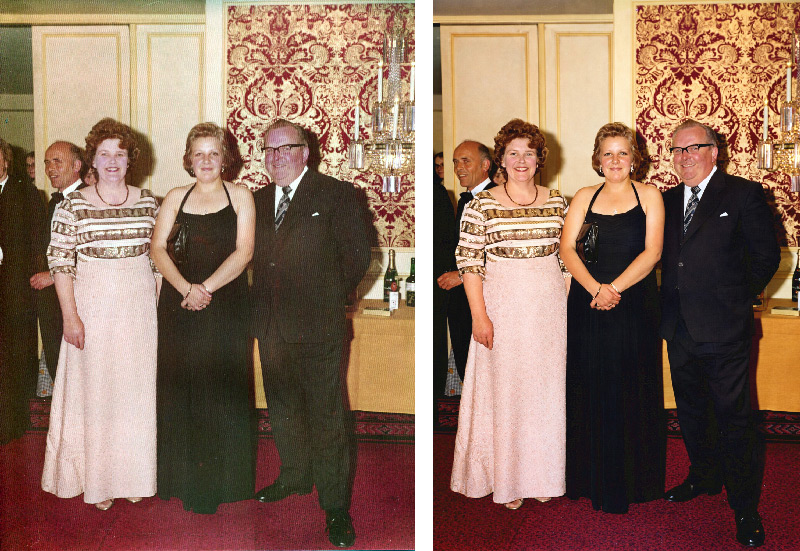
Apply colour correction to a scanned photograph without altering the composition.
The Problem
Despite clear instructions, ChatGPT repeatedly:
-Cropped the left and right edges,
-Removed parts of subjects
-Altered the original framing
-Even after multiple corrections, the issue persisted.
Why This Matters for Photo Restoration
In professional photo restoration:
-Every edge matters
-Cropping can remove irreplaceable details
-Composition must remain intact
AI cropping problems are a major limitation when using automated tools for restoration work.
Case Study 2 – AI Background Replacement Gone Wrong
The Task
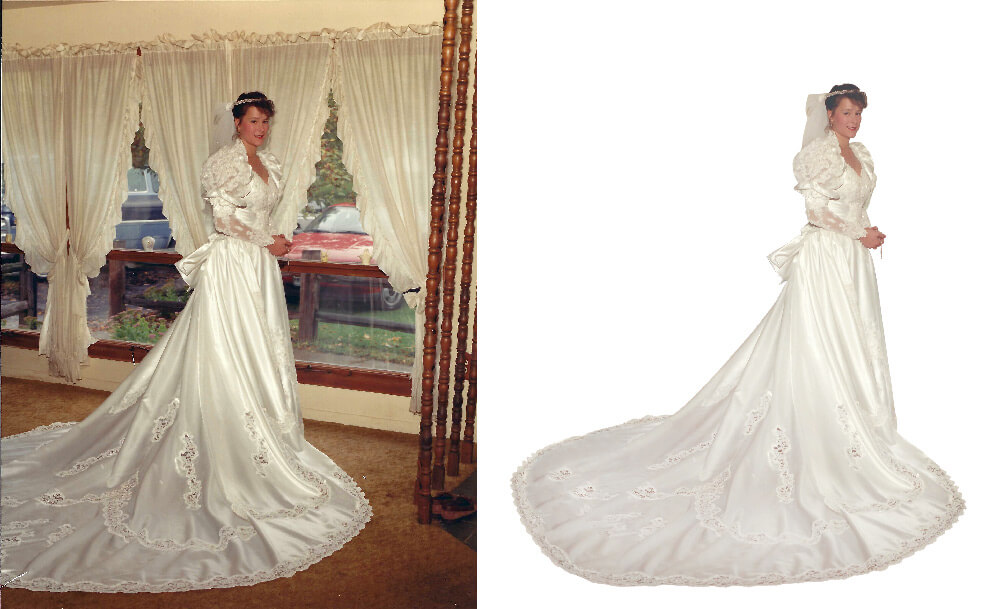
I added the missing part of the dress to the photo and then cut the bride out for the background. I asked AI to add a realistic light blue background to a bridal portrait while:
-Keeping the full dress visible
-Ensuring the subject looks grounded
The Problem
The AI:
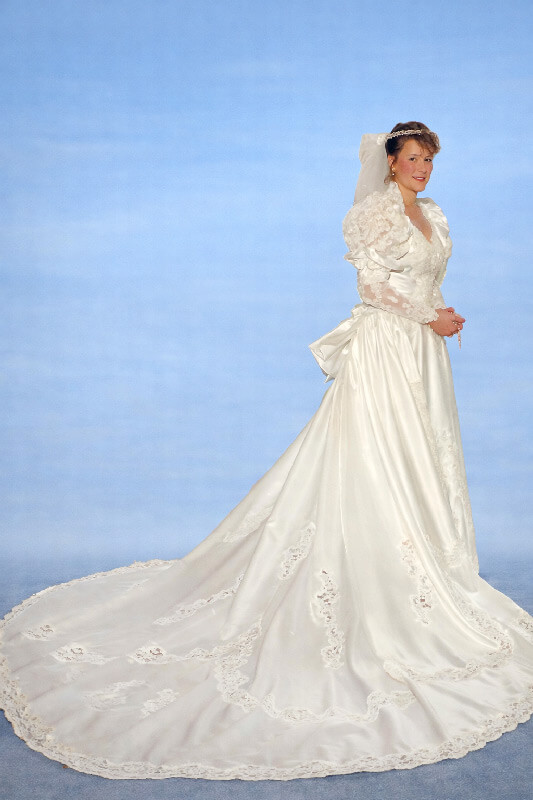
-Cropped the bottom of the dress
-Cut off the train
-Altered the overall composition
Why AI Struggles Here
Background replacement requires:
-Accurate subject masking
-Spatial awareness
-Respect for original framing
-ChatGPT failed on all three.
AI background replacement tools often struggle with full-frame preservation and subject integrity.
Case Study 3 – AI Red Eye & Eye Correction Failure
The Task
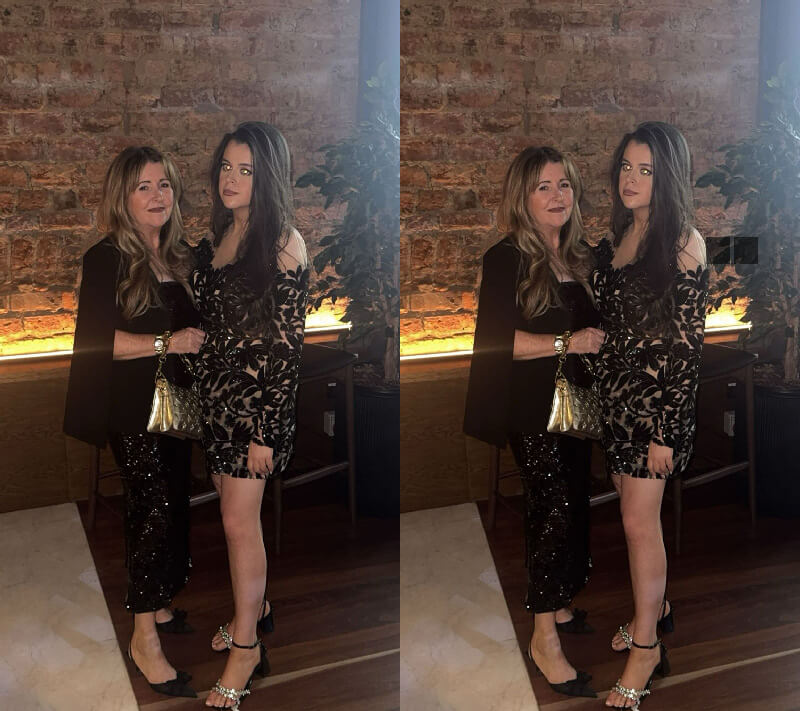
Fix blown-out eyes caused by flash and match them to a natural reference.
The Problem
-Minimal visible improvement – there is no difference in the before and after photos.
-No realistic iris reconstruction
-Poor colour matching
Why This Is a Critical Weakness
Eye correction requires:
-Fine detail editing
-Anatomical accuracy
-Subtle tonal adjustments
AI currently lacks precision in all of these areas.
AI retouching tools are not yet reliable for detailed facial corrections.
Case Study 4 – AI Grass Editing Disaster (Masking Failure)
The Task
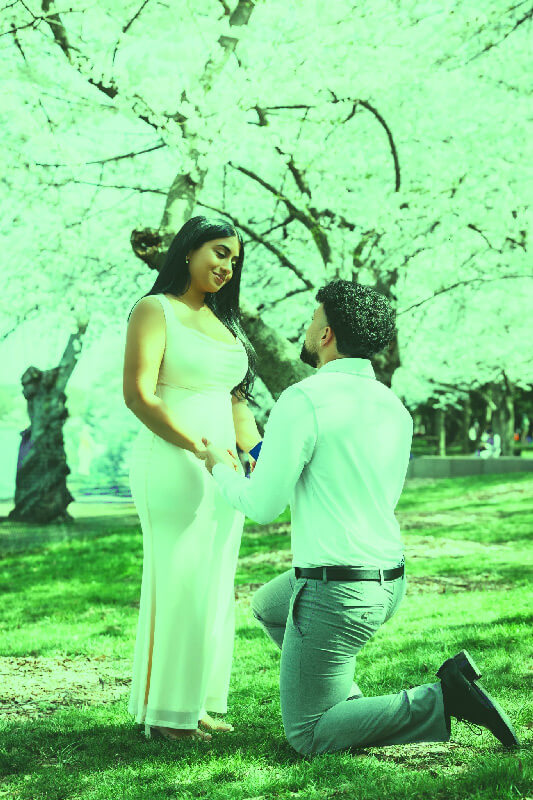
Fix patchy grass by:
-Filling only brown areas
-Leaving people untouched
The Problem
-Entire image tinted green
-Skin tones affected
-No proper subject isolation
-Root Cause
This highlights a major limitation:
-Poor masking and selection
-Inability to distinguish foreground vs background
AI masking failures are one of the biggest barriers to professional-level editing.
The One Success – AI Object Removal (Wine Glasses)
The Task
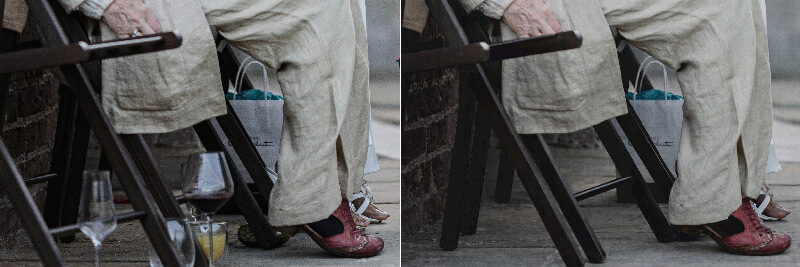
Remove multiple wine glasses from a scene.
The Result
-Clean removal
-Natural background reconstruction
-No visible artefacts
Why This Worked
AI performs well when:
-Removing objects (not reconstructing detail)
-Filling predictable backgrounds
-Working with simple patterns
AI object removal tools are currently one of the strongest use cases for AI editing.
Key Limitations of ChatGPT for Image Editing
1. Poor Instruction Following
Even explicit instructions like “do not crop” were ignored.
2. Weak Composition Awareness
AI struggles to preserve:
-Edges
-Framing
I-mportant visual elements
3. Inconsistent Masking
Selective edits often affect unintended areas.
4. Lack of Precision
Fine-detail work (eyes, textures, skin) is unreliable.
5. Over-Aggressive Edits
Changes are often applied globally rather than selectively.
When AI Photo Editing Works (And When It Doesn’t)
Best Use Cases for AI
-Object removal
-Quick mock-ups
-Basic enhancements
Where AI Falls Short
-Professional retouching
-Photo restoration
-Precision edits
-Complex masking tasks
ChatGPT vs Traditional Photo Editing Tools
While AI tools offer speed and convenience, they currently lack:
-Control
-Precision
-Reliability
Professional tools still outperform AI in:
-Detailed retouching
-Layer-based editing
-Selective adjustments
Final Verdict – Is ChatGPT Good for Image Editing?
ChatGPT shows promise, but based on these tests:
Pros:
-Fast
-Easy to use
-Strong object removal
Cons:
-Cropping issues
-Poor masking
-Weak detail editing
I-nconsistent results
-Bottom Line
AI image editing is a useful assistant—but not a replacement for professional workflows.
Further Reading on AI Photo Editing
For more insights and real-world tests, visit my blog.
Share Your Experience
Have you tried AI for photo editing?
What worked—and what failed?
Sharing real-world results helps cut through the hype and gives a clearer picture of where AI truly stands today.